
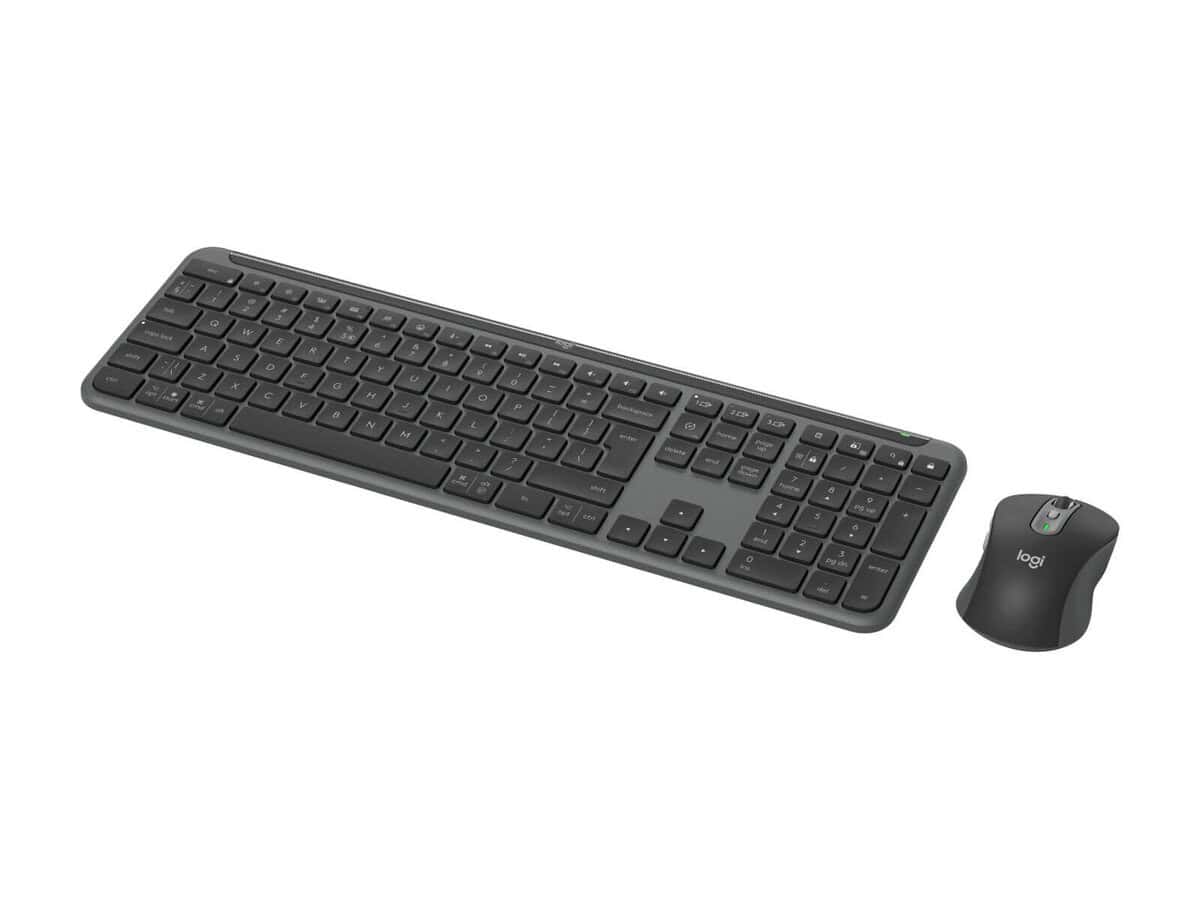

Logitech MK950 Signature Slim keyboard Mouse

R2948.60

BB Store Credit Earn PreviewEarn approx. R58.97 BB Store Credit1% base • +1% payday. Added after successful checkout and available for your next order.
Payflex Peach PAYMENTS Yoco
Brits Brothers SupportNeed help with this part?Fitment, stock, courier and returns help.
WhatsApp
Use Sales Desk, or choose a rotating WhatsApp support line.
Premium System

Complete Repair Package

Open the package builder to choose your vehicle and repair area. It only loads after click.

Logitech MK950 Signature Slim keyboard Mouse offers a sleek wireless solution combining keyboard and mouse functionality for desktop use

Fitment Check
RepairMatch™ Fitment
Confirm this part against your vehicle before you order.
Check Fitment
Opens fitment page
Store Credit Deal
ThunderDeal™ Negotiator
Make a serious online offer and turn the approved value into BB Store Credit.
Open Negotiator
Shortcode page
Repair Package
Complete Repair Bundle
Build a matching repair package using this part as the starting point.
Build Bundle
Opens bundle page
Vehicle Search
Vehicle Parts Finder
Search by vehicle and find related parts faster.
Find Vehicle Parts
Opens finder page

Logitech MK950 Signature Slim keyboard Mouse is a computer peripheral designed for users seeking a sleek, combined keyboard and mouse set. This unit integrates slim-profile keys and a wireless mouse, suitable for comfortable typing and smooth navigation.

This listing highlights the dual function of a keyboard and mouse within one package, making it ideal for office or home computer setups. The keyboard features a slim and modern design to complement workspaces that prioritize minimalism and efficiency. The included mouse is wireless, allowing for less clutter and more freedom of movement compared to wired alternatives.

When considering this product, verify the compatibility with your computer’s wireless connectivity. This set is identified for the Logitech MK950 Signature range and carries the SKU BB-396148 for accurate matching. Buyers should compare their existing peripherals for similar slim design preferences or seek this model specifically if replacing a Logitech MK950 unit.

  • Includes both keyboard and mouse in one slim profile set
  • Wireless mouse offers convenience and flexibility
  • Designed for Logitech MK950 Signature product users

For questions about fitment or specific features, consulting the sales team or submitting a request via the respective support options is recommended to ensure this product meets your requirements.

Need help matching this item to your vehicle? Use Logitech K250 Wireless Keyboard, Vehicle Parts Finder or Request a Part with your VIN, engine number, part number or clear photos.

Frequently Asked Questions

Confirm fitment before ordering
Quick answers before you order. If anything is unclear, confirm fitment first using your VIN or part number and avoid mistakes.
Helpful product answers
What are the main features of the Logitech MK950 Signature Slim keyboard and mouse combo?
The Logitech MK950 Signature Slim offers a sleek, modern design with a slim keyboard and a comfortable wireless mouse. It provides reliable wireless connectivity and is designed for efficient typing and smooth cursor control. This combo is ideal for users seeking a stylish and functional setup for everyday computing tasks.
Is the Logitech MK950 Signature Slim compatible with all operating systems?
The MK950 Signature Slim is generally compatible with most major operating systems, including Windows and macOS. However, some advanced features may require specific drivers or software. For optimal performance, ensure your system supports standard wireless peripherals and check Logitech's official site for any software updates.
How do I connect the Logitech MK950 Signature Slim keyboard and mouse to my computer?
This combo typically connects via a single USB receiver that plugs into your computer’s USB port, providing a reliable wireless connection. Simply plug in the receiver, turn on the keyboard and mouse, and they should pair automatically. If you need assistance, our Trade Partners can guide you through the setup process.
What is the battery life like for the Logitech MK950 Signature Slim keyboard and mouse?
Battery life is not specified for this model, but Logitech wireless devices usually offer extended usage on a single set of batteries. To maximize battery life, turn off the devices when not in use and replace batteries as needed. For specific battery recommendations, consult the product manual or contact our Trade Partners.
Can I get replacement parts or support for the Logitech MK950 Signature Slim?
Yes, Brits Brothers™ supports Trade Partners with genuine replacement parts and expert advice. If you need a replacement keyboard, mouse, or accessories, you can request parts through our website or contact us directly. For more details, visit our Request a Part page.