
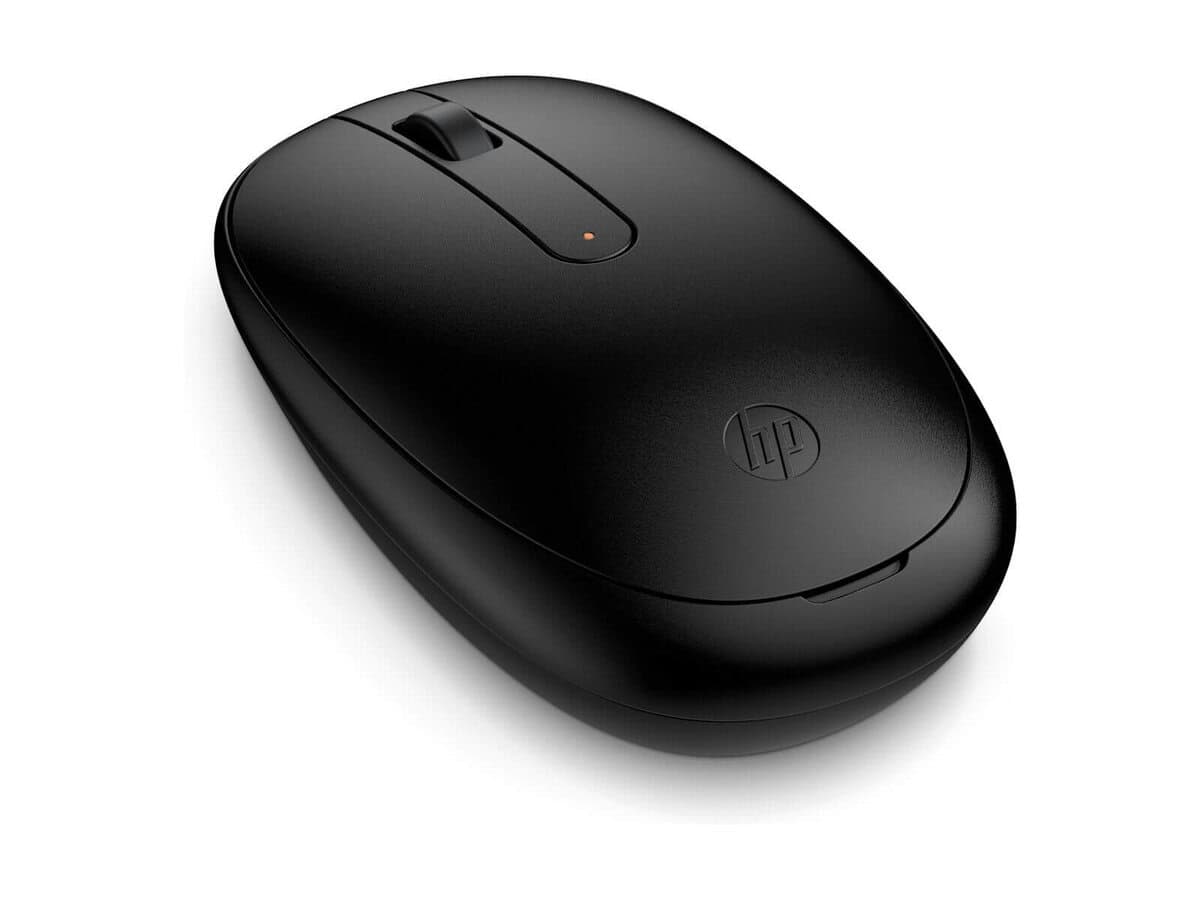



HP 245 Bluetooth Mouse

R512.60

BB Store Credit Earn PreviewEarn approx. R12.82 BB Store Credit1% base • +1% payday • +0.5% weekend. Added after successful checkout and available for your next order.
Payflex Peach PAYMENTS Yoco
Brits Brothers Support

Need help with this part?

Fitment, stock, courier and returns help.
Click any service to learn more.
Repair package

Complete Repair Package

Open the package builder to choose your vehicle and repair area. It only loads after click.

HP 245 Bluetooth Mouse offers wireless connectivity and precise control for your computer needs

HP 245 Bluetooth Mouse is a wireless computer peripheral designed for users seeking a reliable Bluetooth connection without cables. This mouse operates via Bluetooth, allowing seamless use with compatible devices that support wireless Bluetooth accessories. It is mainly targeted at users needing a convenient, cordless navigation solution for laptops, desktops, or tablets that pair with Bluetooth-enabled input devices.

This particular unit is identified under SKU BB-396011 and features a simple plug-free design. Since this mouse connects via Bluetooth, compatibility depends on the host device’s Bluetooth version and driver support, making it important for buyers to verify their device’s Bluetooth functionality matches the mouse’s requirements. It typically replaces or supplements a wired mouse or previous wireless mouse models lacking Bluetooth capability.

Buyers should compare this mouse’s form factor and connectivity type against their existing mouse to ensure the this part suits their ergonomic preferences and technology setup. Since it is a wireless Bluetooth peripheral, it is ideal for users who prefer clutter-free desks and mobility without sacrificing basic pointing and clicking functions.

Need help matching this item to your vehicle? Use Logitech K250 Wireless Keyboard, Vehicle Parts Finder or Request a Part with your VIN, engine number, part number or clear photos.

Research before ordering

Guides related to this product

Use these references to compare condition, fitment evidence and buying checks.

Frequently Asked Questions

Confirm fitment before ordering
Quick answers before you order. If anything is unclear, confirm fitment first using your VIN or part number and avoid mistakes.
Helpful product answers
Is the HP 245 Bluetooth Mouse compatible with both Windows and Mac operating systems?
The HP 245 Bluetooth Mouse is designed to work seamlessly with most Bluetooth-enabled devices, including Windows and Mac OS. However, for optimal performance, ensure your device supports Bluetooth 4.0 or higher. Compatibility with specific OS versions is not specified, so checking your system's Bluetooth settings before purchase is advisable.
What is the typical battery life of the HP 245 Bluetooth Mouse, and how is it powered?
The HP 245 Bluetooth Mouse operates on standard batteries, though the exact type and battery life are not specified. Generally, Bluetooth mice offer several weeks of use on a single set of batteries depending on usage patterns. It is recommended to keep spare batteries handy to avoid interruptions during work.
Can the HP 245 Bluetooth Mouse be used with multiple devices simultaneously?
This model supports Bluetooth connectivity but does not specify multi-device pairing capabilities. Typically, Bluetooth mice connect to one device at a time, requiring manual switching if used across multiple devices. For multi-device use, consider checking device compatibility or using a Bluetooth adapter that supports multiple connections.
What should Trade Partners know about sourcing the HP 245 Bluetooth Mouse from Brits Brothers™?
Trade Partners can access the HP 245 Bluetooth Mouse through Brits Brothers™ with reliable stock availability. For bulk orders or specific inquiries, contacting our Trade Partner support ensures tailored assistance. Visit our Trade Partners page for more details and to establish a partnership.
How do I verify that the HP 245 Bluetooth Mouse will fit my laptop or workspace ergonomically?
The HP 245 Bluetooth Mouse features a compact and lightweight design suitable for most laptop users and workspace setups. To ensure ergonomic comfort, consider the mouse’s dimensions and your hand size. If possible, test a similar model in-store or review user feedback to confirm it meets your comfort requirements.