
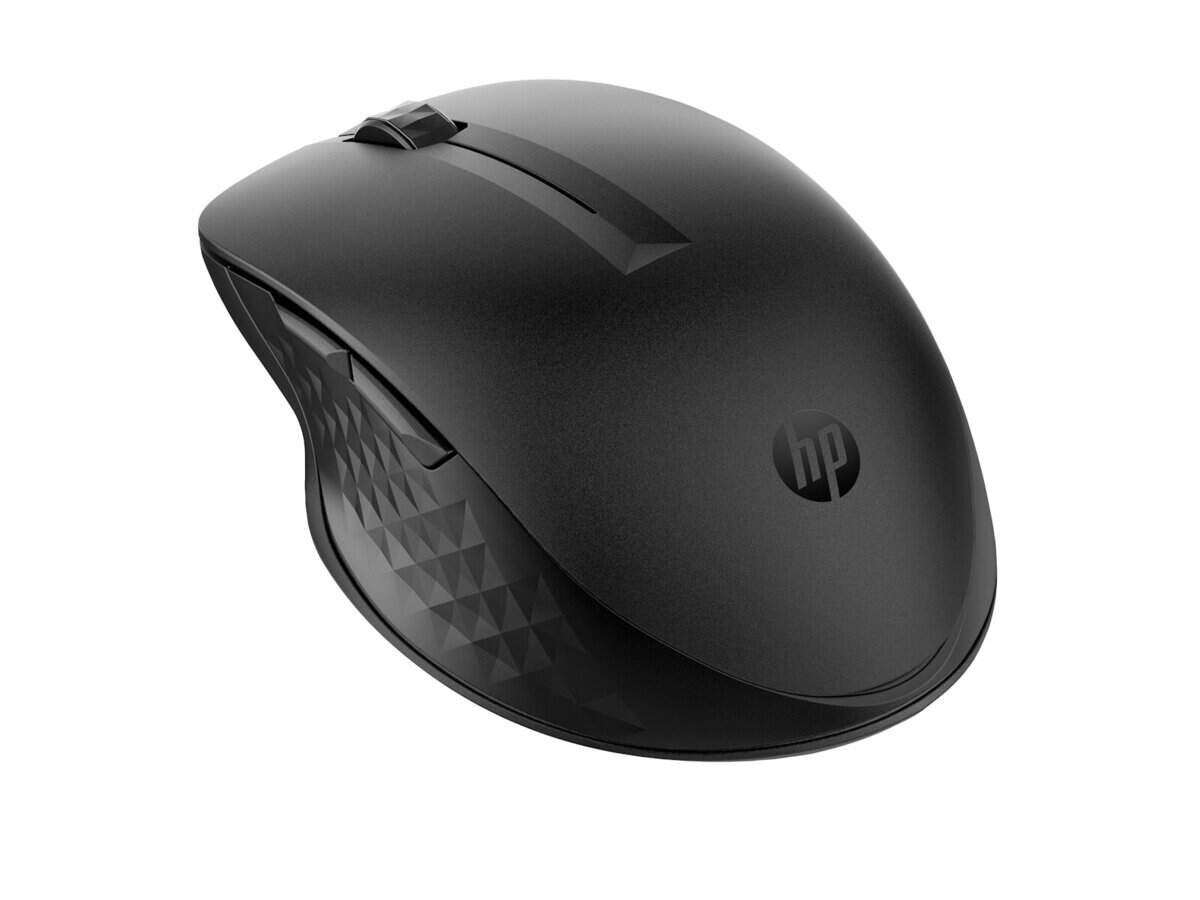



HP 435 Multi-Device Wireless Mouse

R862.60

BB Store Credit Earn PreviewEarn approx. R21.57 BB Store Credit1% base • +1% payday • +0.5% weekend. Added after successful checkout and available for your next order.
Payflex Peach PAYMENTS Yoco
Brits Brothers Support

Need help with this part?

Fitment, stock, courier and returns help.
Click any service to learn more.
Repair package

Complete Repair Package

Open the package builder to choose your vehicle and repair area. It only loads after click.

HP 435 Multi-Device Wireless Mouse provides wireless connectivity for multiple devices, suitable for computer users seeking versatile mouse options

HP 435 Multi-Device Wireless Mouse is a computer peripheral designed for efficient wireless control across multiple devices. This wireless mouse offers convenience and flexibility by allowing users to switch easily between connected devices, making it ideal for multitasking in both professional and home environments.

This unit operates without the need for cables, reducing desk clutter and enhancing mobility. It is suitable for users who require precise cursor movement and simple device pairing, supporting seamless interaction across laptops, desktops, and compatible digital devices. The wireless capability is central to its function, enabling freedom of movement within the wireless range.

When selecting this mouse, compare it against your current device’s connectivity options and compatibility to ensure it meets your workflow needs. Key decision points include your device’s Bluetooth or wireless receiver support and your preference for multi-device utility. If unsure about compatibility or specific features, consulting a specialist or using a vehicle parts finder may provide clarity.

  • Supports multi-device wireless operation
  • Cable-free design for cleaner workspace
  • SKU: BB-395990 for straightforward identification

This listing is focused on the this part, designed for users seeking an efficient input device that simplifies control across several technology platforms.

Need help matching this item to your vehicle? Use Logitech K250 Wireless Keyboard, Vehicle Parts Finder or Request a Part with your VIN, engine number, part number or clear photos.

Research before ordering

Guides related to this product

Use these references to compare condition, fitment evidence and buying checks.

Frequently Asked Questions

Confirm fitment before ordering
Quick answers before you order. If anything is unclear, confirm fitment first using your VIN or part number and avoid mistakes.
Helpful product answers
Is the HP 435 Multi-Device Wireless Mouse compatible with both Windows and Mac operating systems?
Yes, the HP 435 Multi-Device Wireless Mouse supports multiple operating systems including Windows and Mac. It connects seamlessly via Bluetooth or the included USB receiver, ensuring broad compatibility for various devices. This makes it ideal for users who switch between different platforms.
How many devices can the HP 435 Multi-Device Wireless Mouse connect to simultaneously?
The HP 435 Multi-Device Wireless Mouse can connect to up to three devices at the same time. Users can easily switch between these devices with the touch of a button, enhancing productivity for those managing multiple computers or tablets. This multi-device feature is especially useful for trade partners handling diverse setups.
What type of battery does the HP 435 Multi-Device Wireless Mouse use and what is its expected battery life?
The HP 435 Multi-Device Wireless Mouse uses AA batteries, which provide long-lasting power for extended use. While exact battery life is not specified, users can expect several weeks of operation under normal usage conditions. It is advisable to keep spare batteries handy to avoid interruptions.
Can the HP 435 Multi-Device Wireless Mouse be used on different surfaces without a mouse pad?
Yes, the HP 435 Multi-Device Wireless Mouse features an optical sensor that performs well on most surfaces including wood, plastic, and fabric. However, for optimal precision and comfort, using a mouse pad is recommended. This ensures smooth tracking and reduces wear on the mouse feet.
Does the HP 435 Multi-Device Wireless Mouse require any special drivers or software for installation?
No special drivers are required for the HP 435 Multi-Device Wireless Mouse as it uses standard Bluetooth and USB connectivity protocols. It is typically plug-and-play, allowing for quick setup on most modern computers. For any additional support or parts, trade partners can contact Brits Brothers™ directly via WhatsApp.