
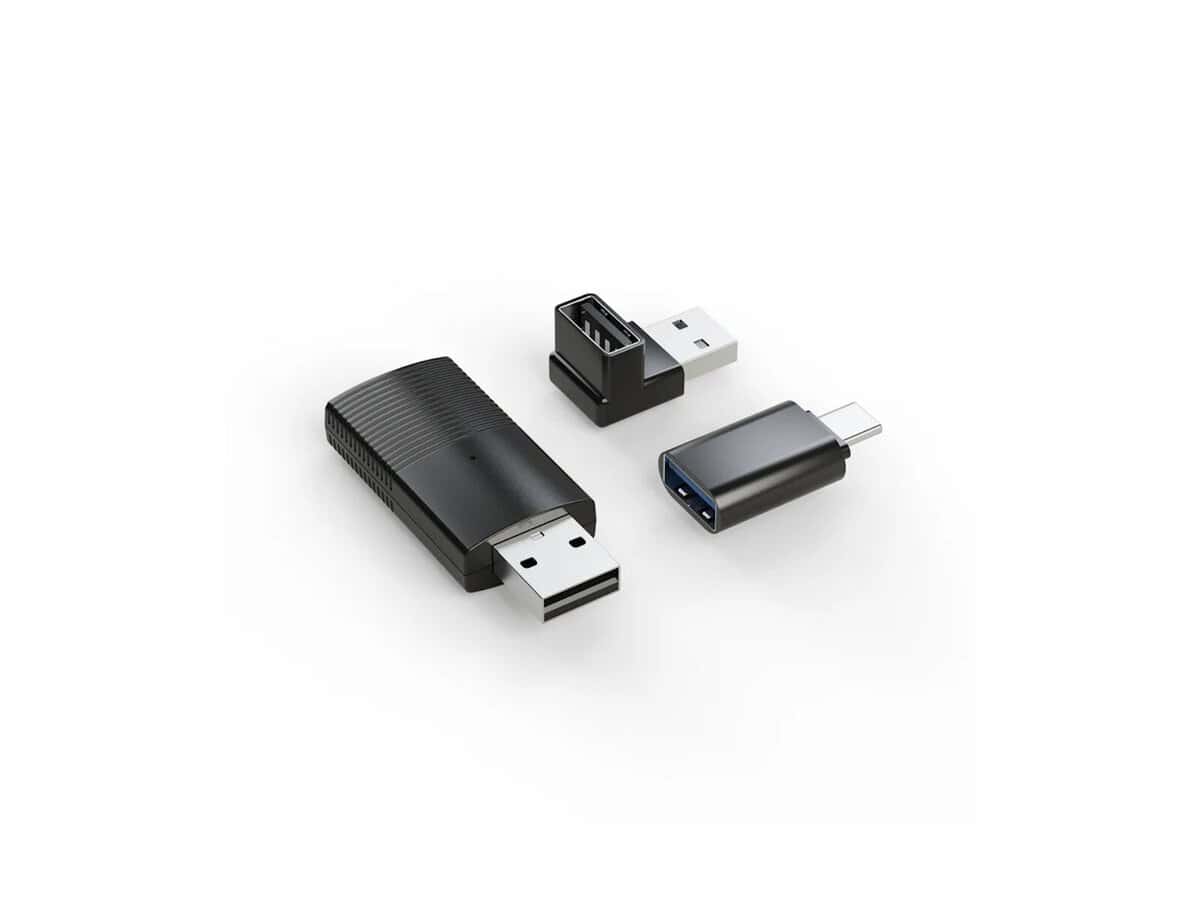

Minix Wireless CarPlay Dongle Stick

R1548.60

BB Store Credit Earn PreviewEarn approx. R15.49 BB Store Credit1% base. Added after successful checkout and available for your next order.
Payflex Peach PAYMENTS Yoco
Brits Brothers SupportNeed help with this part?Fitment, stock, courier and returns help.
WhatsApp
Use Sales Desk, or choose a rotating WhatsApp support line.
Premium System

Complete Repair Package

Open the package builder to choose your vehicle and repair area. It only loads after click.

Minix Wireless CarPlay Dongle Stick allows wireless connection to CarPlay-enabled vehicles. It functions as a wireless adapter for CarPlay systems

Fitment Check
RepairMatch™ Fitment
Confirm this part against your vehicle before you order.
Check Fitment
Opens fitment page
Store Credit Deal
ThunderDeal™ Negotiator
Make a serious online offer and turn the approved value into BB Store Credit.
Open Negotiator
Shortcode page
Repair Package
Complete Repair Bundle
Build a matching repair package using this part as the starting point.
Build Bundle
Opens bundle page
Vehicle Search
Vehicle Parts Finder
Search by vehicle and find related parts faster.
Find Vehicle Parts
Opens finder page

Minix Wireless CarPlay Dongle Stick is a compact computer peripheral designed to enable wireless CarPlay connectivity. This dongle allows compatible vehicles or infotainment systems that support CarPlay to connect wirelessly, eliminating the need for a physical USB connection.

The dongle acts as a bridge between your smartphone and your car’s multimedia interface, providing seamless access to apps, music, navigation, and calls through a wireless connection. Its stick form factor makes it easy to plug into the vehicle’s USB port without occupying excessive space or interfering with controls.

When considering this dongle, compare it with your current wired CarPlay setup or confirm that your car supports wireless CarPlay functionality. Buyers should check that the vehicle’s system or aftermarket head unit supports wireless CarPlay before purchase, as this dongle enhances connectivity but does not alter the vehicle hardware itself.

  • Category: Computer Peripheral or Wireless Mouse
  • SKU: BB-395684 for easy identification and ordering
  • Intended use: Minix Wireless CarPlay compatible systems

This listing for the this part suits users seeking to upgrade their in-car smartphone interface for convenience and cable-free operation. For specific fitment or compatibility queries, contacting the sales desk or submitting a request is advisable.

Need help matching this item to your vehicle? Use Logitech K250 Wireless Keyboard, Vehicle Parts Finder or Request a Part with your VIN, engine number, part number or clear photos.

Frequently Asked Questions

Confirm fitment before ordering
Quick answers before you order. If anything is unclear, confirm fitment first using your VIN or part number and avoid mistakes.
Helpful product answers
What is the Minix Wireless CarPlay Dongle Stick used for?
The Minix Wireless CarPlay Dongle Stick allows you to connect your iPhone wirelessly to your car's infotainment system. It enables seamless access to Apple CarPlay features such as navigation, music, and calls without the need for cables. This enhances driving convenience and safety by keeping your phone hands-free.
Is the Minix Wireless CarPlay Dongle Stick compatible with all car models?
Compatibility depends on whether your car's infotainment system supports Apple CarPlay via USB. The dongle converts a wired CarPlay connection to wireless, so your vehicle must have a wired CarPlay port. Check your car’s manual or consult with Trade Partners for compatibility details.
How do I set up the Minix Wireless CarPlay Dongle Stick?
Plug the dongle into your car’s USB port that supports CarPlay. Then, pair your iPhone via Bluetooth and Wi-Fi as prompted. A common mistake is not enabling Wi-Fi and Bluetooth on the phone, which prevents connection. Ensure both are active before pairing to avoid connectivity issues.
Can I use the Minix Wireless CarPlay Dongle Stick with Android phones?
No, this dongle is specifically designed for Apple CarPlay and works only with iPhones. Android phones use Android Auto, which requires different hardware. For Android compatibility, consider other wireless dongles designed for Android Auto.
What should I do if the Minix Wireless CarPlay Dongle Stick stops working?
First, try restarting both your car’s infotainment system and your iPhone. If the problem persists, check for firmware updates for the dongle or your car system. For further assistance or to request a replacement part, contact Brits Brothers™ Trade Partners or visit Request a Part.
Does the Minix Wireless CarPlay Dongle Stick affect the car’s warranty?
Using the dongle generally does not void your car’s warranty as it is a plug-and-play accessory. However, it’s best to confirm with your vehicle manufacturer or Trade Partners to ensure compliance with warranty terms. Avoid forcing the device into incompatible ports to prevent damage.