
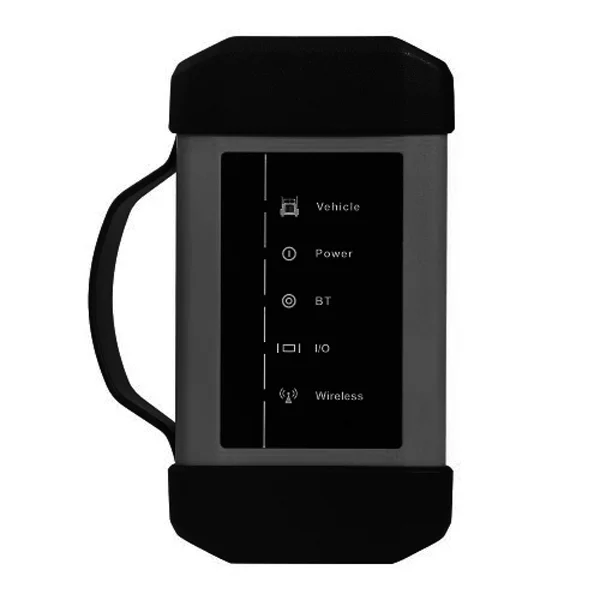
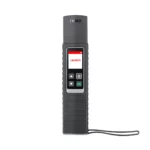
Launch X-431 HDIII Heavy Duty Module for PRO3 & PAD3 (1 Year software activation + OBD adapter cables) is listed as an auto-part option. Confirm fitment, part number and compatibility before purchase, especially where vehicle-specific matching is required.
LAUNCH X431 HD3 is Ultimate Heavy Duty Truck Diagnostic Adapter. With full comprehensive diagnostic software function, it’s the most convenient and easy to scan and diagnose the vehicle. It supports wireless Bluetooth diagnosis for various car models. Work with X431 PRO3 and X431 V+ scanners to support trucks and commercial vehicles
Launch X-431 HDIII Heavy Duty Module User Manual.pdf
X-431 Heavy-duty Truck Module is a new generation heavy-duty truck fault diagnostic tool developed by Launch Tech regarding internet application on the basis of Android OS. It communicates with X-431 PRO3 through Bluetooth to achieve fault diagnosis for various car models and full systems. Advantages include wide car model coverage, powerful test function, more special functions and accurate test data, etc.
With this device, you test heavy equipment at 12 / 24V. Connections via USB and Bluetooth. The package also includes the necessary additional adapters.
The new LAUNCH heavy-duty module is perfect for a shop that works on heavy-duty (Class 4 through 8) and medium trucks.
Features:
Full comprehensive HD truck diagnostic software functions
Wide diagnostic software coverage (Full comprehensive diagnostic software functions.)
Accurate test data
Release new software versions timely to let customers enjoy the latest service
Able to test trucks with 12V or 24V battery diesel engines. When testing 24V truck, battery conversion is not required
Diagnostic hardware is designed according to international standards, compatible with diagnostic interfaces of worldwide models
Including wide-range connectors and cable
Wide diagnostic software coverage. Accurate test data. Software based on Android, matching with more diagnostic hosts.
Various configurations are available for selection to suppose you are going to purchase a heavy-duty truck diagnostic tool, you must choose X-431 V+, X-431 PRO3 or X-431 PAD II as the host machine. If you have already bought X-431 V+, X-431 PRO3 or X-431 PAD II gasoline configuration, now you want to test truck, just buy a heavy-duty truck module.
Highlights:
One Year Free Update Online on Launch Official Website
Multi-Language Supported: English, German, French, Spanish, Italian, Chinese, Japanese, Russian
IP65 Protection, and with a shockproof case
Indicators Showing The Status of The Connection in Real-Time
Wireless Bluetooth Diagnosis: The host machine and diagnostic connector adopt Bluetooth connection, making diagnosis more convenient.
Support Various Car Models: 36 Brands of Foreign Trucks with The Possibility of Expanding the Supported Brands
Industrial Shockproof Design: Industrial shockproof design is perfect for the working environment in repair shops.
Functions:
Identification of control units
Adaptation of control units
Reset service intervals
Reading vehicle data streams
Display of current system parameters
Check actuators
Reading and erasing vehicle fault codes
Notice:
The HD module must work on any of the x431 v plus or pro3 or pad ii accounts which old customers have purchased before and have been activated by LAUNCH already. If not have the x431 v plus or pro3 or pad ii account, this HD module alone cannot be activated and the diagnostic software cannot be downloaded from LAUNCH official website. Thank you for your understanding.
Supported Car Brands:
Vehicle Brands:
Mercedes-Benz, Man, Volvo, Daf, Scania, Iveco, Renault, Freightliner, International, Kenworth, Peterbilt, Stering, Western Star, Mack, Hino, Fuso, Isuzu, UD, etc.
Vehicle Connection
:
Locate the vehicle’s DLC: The DLC (Data Link Connector) is typically a connector where diagnostic code readers interface with the vehicle’s onboard computer. The DLC location varies from vehicle to vehicle. It is generally located in a driver’s cab. If no DLC is found, please refer to Automobile Repair Manual
Switch the ignition on
For vehicles equipped with an OBD II management system, plug one end of the diagnostic cable into the vehicle’s DLC, and the other end into the diagnostic socket of the HD device, and then tighten the captive screws.
To perform vehicle diagnosis via data cable, connect the B-shaped terminal of the data cable to the HD III and the other end to the data I/O port of the scan tool.
Activate HD III & Download Software:
If you had a diagnostic tool of 12V passenger car configuration and intend to extend the diagnostics of commercial vehicles, follow the steps described below to activate the HD III: Note: Please make sure that the diagnostic tool is properly connected to the Internet before proceeding with this step.
Launch the application, and log in to the system using the existing user account of Passenger Vehicle Configuration, and then tap “Personal Center (or )” -> “Activate VCI ( or “Activate Connector”)”
Input the Product S/N and Activation Code, which can be found in the supplied Password Envelope, then tap “Activate” to activate the HD III.
Tap “Update” to enter update center, tap “Update” to download and install the diagnostic software of Commercial vehicles.
After the software download is complete, a new “Heavy-duty” tab will appear on the Diagnostic main menu screen.
Toggle Between Passenger and Commercial Vehicles:
If several VCI connectors and HD III devices are activated on the diagnostic tool, a list of connectors will be displayed in the “VCI ( or “My Connector”)”, which can be accessed by tapping “Personal Center ( or -> “Profile”)”.
1. Switch from a passenger car to a commercial vehicle
If you want to switch from a passenger car to a commercial vehicle, enter “VCI (or “My Connector”) -> select the HD III S/N (starting with 98649) -> Return to the diagnostic main menu -> connect the HD III, diagnostic tool and vehicle -> tap “Heavy-duty” tab to select the corresponding vehicle model -> to follow the on-screen prompts to start a diagnostic session.
2. Switch from a commercial vehicle to a passenger car
To switch from a commercial vehicle to a passenger car, enter “VCI (or “My Connector”) -> select the VCI connector S/N -> Return to the diagnostic main menu -> connect the VCI connector, scan tool and vehicle -> Use VINScan (or manual diagnosis) to start diagnosis
Specifications:
10″ High resolution IPS capacitive touchscreen
Working Voltage: 9-36V
Power Consumption: ≤3.0W
Working Temperature: -10℃~50℃
Communication: USB/ Bluetooth/ Wi-Fi
CPU: 120MHz
Package List:
1pc x X-431 HD Module
1pc x Quick Start Guide
1 set x Diagnostic Cables
1 set x USB Cables
1pc x Cigarette Lighter
1pc x Battery Clamps Cable
1pc x Adaptor Cable Kit
1pc x Power Adapter
1pc x Password envelope