
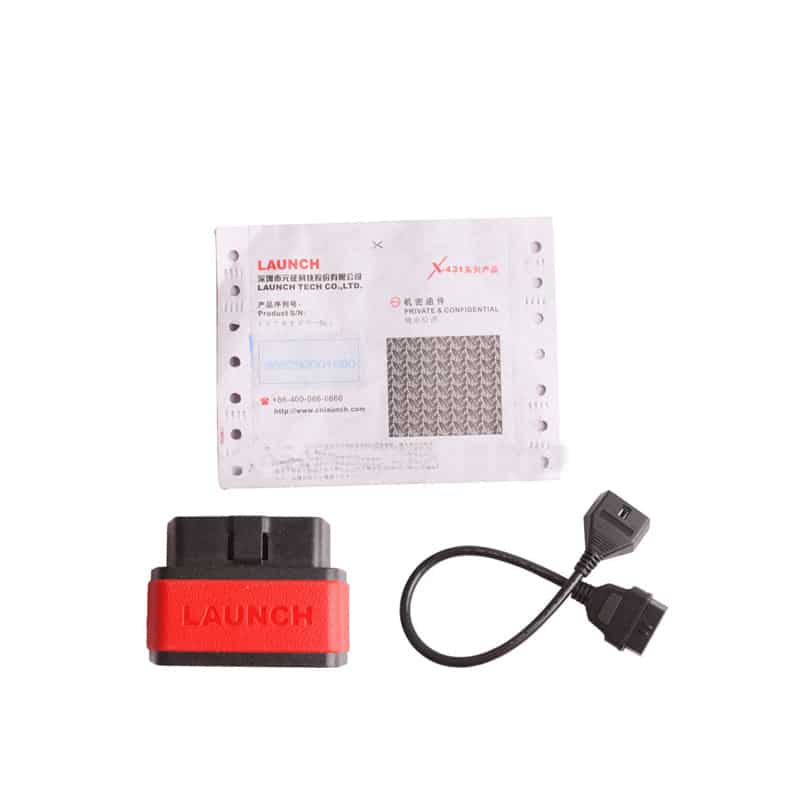
Launch X431 X-431 Auto Diag X431 iDiag Diagnostic Tool Bluetooth for Android or iOS Car scanner OBD2 OBD Diagnostic-Tool

R13150.00

BB Store Credit Earn PreviewEarn approx. R350.00 BB Store Credit1% base • +4% order tier. Added after successful checkout and available for your next order.
Payflex Peach PAYMENTS Yoco
Brits Brothers SupportNeed help with this part?Fitment, stock, courier and returns help.
Click any service to learn more.
Repair package

Complete Repair Package

Open the package builder to choose your vehicle and repair area. It only loads after click.

Launch X431 X-431 Auto Diag X431 iDiag Diagnostic Tool Bluetooth for Android or iOS Car scanner OBD2 OBD Diagnostic-Tool allows vehicle diagnostics via smartphone apps using Bluetooth connection

Launch X431 X-431 Auto Diag X431 iDiag Diagnostic Tool Bluetooth for Android or iOS Car scanner OBD2 OBD Diagnostic-Tool is a versatile diagnostic device designed to interface with vehicle OBD2 systems via Bluetooth technology. This tool allows users to connect wirelessly to their Android or iOS devices, transforming smartphones or tablets into advanced car diagnostic scanners.

The diagnostic tool reads and clears trouble codes, displaying the results on compatible mobile devices. It is useful for anyone needing to monitor engine status, assess fault codes, or conduct preliminary vehicle diagnostics. Ideal for DIY mechanics or professional users who want quick access to vehicle health data without the need for a physical scanner display.

When choosing this unit, compare your current OBD2 scanner capabilities and ensure your vehicle supports Bluetooth communication. This listing is for the Launch branded diagnostic solution known for its broad vehicle coverage and mobile platform compatibility. The unit connects to a wide range of vehicles that support the OBD2 protocol, making it a flexible choice across many makes and models.

  • Connects via Bluetooth to Android or iOS devices
  • Functions as an OBD2 diagnostic scanner for fault code reading and clearing
  • Portable and easy to carry for on-the-go diagnostics

Need help matching this item to your vehicle? Use Vehicle Parts Finder, Request a Part or Platinum Sales Desk with your VIN, engine number, part number or clear photos.

Frequently Asked Questions

Confirm fitment before ordering
Quick answers before you order. If anything is unclear, confirm fitment first using your VIN or part number and avoid mistakes.
Helpful product answers
What vehicles are compatible with the Launch X431 iDiag Diagnostic Tool?
The Launch X431 iDiag supports a wide range of vehicles that comply with OBD2 protocols, including most cars manufactured after 1996. It works with both petrol and diesel engines. However, compatibility may vary depending on the vehicle make and model, so checking specific support for your car is recommended.
How does the Bluetooth connection work with Android and iOS devices?
The diagnostic tool connects wirelessly via Bluetooth to Android or iOS smartphones and tablets. After installing the dedicated app, you can pair the device easily to your mobile device for real-time diagnostics. This wireless setup allows for convenient and portable vehicle scanning without cables.
Can the Launch X431 iDiag read and clear all types of fault codes?
Yes, the tool can read and clear generic OBD2 fault codes as well as many manufacturer-specific codes. This includes engine, transmission, ABS, and airbag systems. Clearing fault codes helps reset warning lights after repairs, but always ensure issues are properly diagnosed before clearing codes.
Is there a warranty or support available for this diagnostic tool?
Warranty details are not specified for this product. For technical support or warranty inquiries, contacting Brits Brothers™ directly or consulting their Trade Partners page is advisable. They can provide assistance with product issues or service options.
Where can I get replacement parts or accessories for the Launch X431 iDiag?
If you need replacement parts or accessories, Brits Brothers™ offers a request service through their website. You can submit specific part requests at Request a Part. This ensures you get genuine components compatible with your diagnostic tool.