
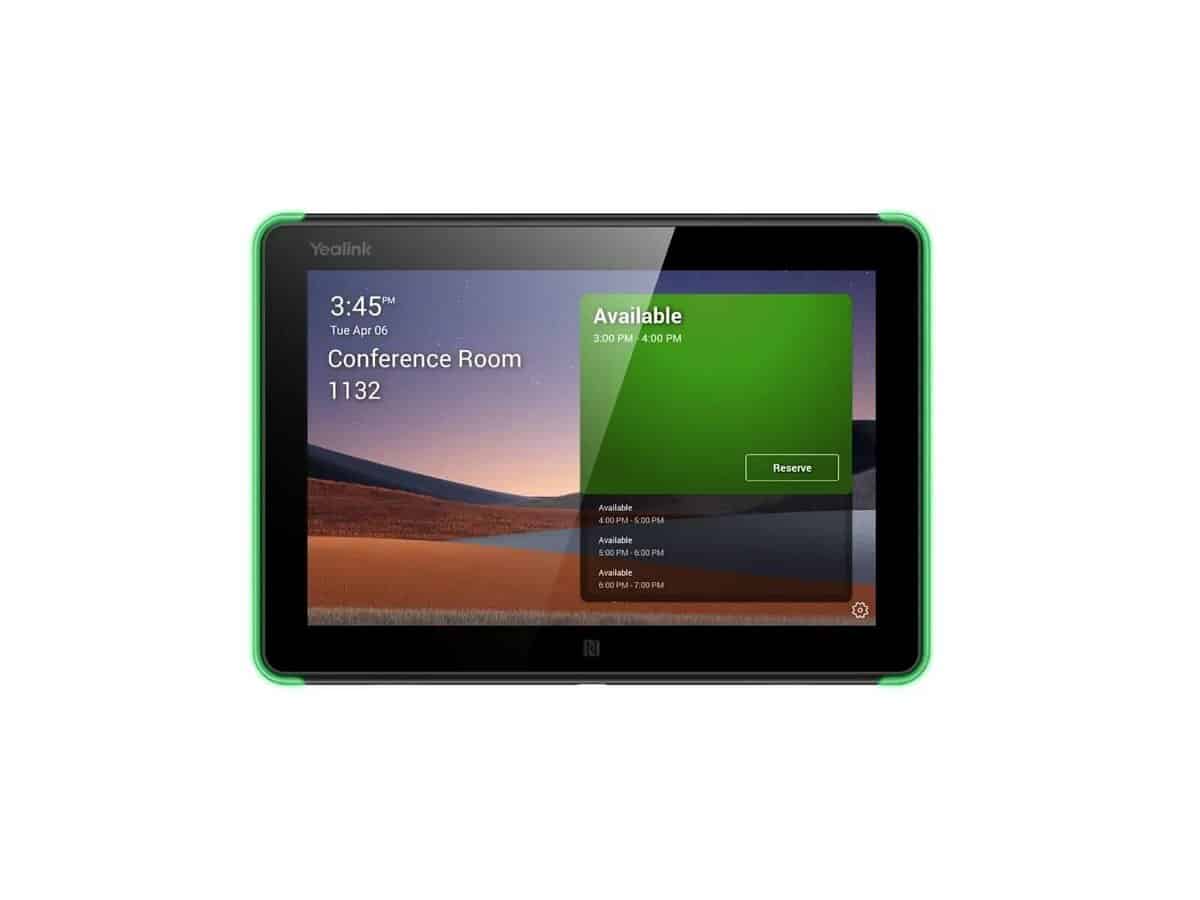

Yealink RoomPanel (Universal Version)

R13798.60

BB Store Credit Earn PreviewEarn approx. R350.00 BB Store Credit1% base • +4% order tier • +1% payday • +0.5% weekend. Added after successful checkout and available for your next order.
Payflex Peach PAYMENTS Yoco
Brits Brothers Support

Need help with this part?

Fitment, stock, courier and returns help.
Click any service to learn more.
Repair package

Complete Repair Package

Open the package builder to choose your vehicle and repair area. It only loads after click.

Yealink RoomPanel (Universal Version) is a universal accessory listed under Universal Quick Cut Blades category. Suitable for various uses requiring a universal room panel

Yealink RoomPanel (Universal Version) is a versatile accessory designed for universal compatibility within its category of quick cut blades. This product caters to diverse user requirements where flexibility and adaptability are key. As a universal model, it does not target specific vehicles or brands but serves a broad range of applications.

This listing offers the Yealink RoomPanel component marked under SKU BB-395451, streamlined for users needing an effective, general-purpose quick cut blade solution. Buyers should compare this unit’s dimensions and blade type with their existing parts to ensure matching functionality. The universal design means it suits any setup that accommodates this kind of blade accessory.

Quick cut blades like this are essential for precise trimming or cutting tasks, typically used on various tools or machines that require blade replacement or upgrade. When considering this product, check that the blade profile and mounting system in your current equipment align with this universal version to maintain operational effectiveness.

  • Type: Universal quick cut blade
  • SKU: BB-395451
  • Use case: General purpose blade replacement or upgrade

For those uncertain about compatibility or needing assistance selecting the right blade, reaching out to technical support or submitting a request through dedicated service channels is recommended. This ensures the purchase aligns with your equipment’s specifications and intended use.

Not sure the code, size or specification matches? Use Lenovo Universal USB-C Dock – SA or Request a Part with a clear photo of the old part before checkout.

Frequently Asked Questions

Confirm fitment before ordering
Quick answers before you order. If anything is unclear, confirm fitment first using your VIN or part number and avoid mistakes.
Helpful product answers
What is the Yealink RoomPanel (Universal Version) used for?
The Yealink RoomPanel (Universal Version) is designed to display meeting room schedules and availability clearly outside conference rooms. It integrates with calendar systems to provide real-time updates, helping to manage room bookings efficiently and avoid scheduling conflicts.
Is the Yealink RoomPanel compatible with all Yealink conference phones?
This Universal Version is designed to work broadly with Yealink's ecosystem, but compatibility may vary depending on the specific conference phone model and software version. It is advisable to check your device's compatibility or consult with our Trade Partners for precise fitment details.
How do I install the Yealink RoomPanel on my meeting room door?
Installation involves mounting the panel outside the meeting room, typically at eye level for easy visibility. The panel connects to your network via Ethernet or Wi-Fi, and setup requires linking it to your calendar system. For detailed guidance, professional installation support from our Trade Partners is recommended.
Can the Yealink RoomPanel be integrated with popular calendar platforms?
Yes, the RoomPanel supports integration with major calendar platforms such as Microsoft Exchange, Office 365, and Google Calendar. This ensures that room bookings and schedules are synchronized in real time, providing accurate availability information to users.
What should I do if the Yealink RoomPanel is not displaying updated schedules?
If the RoomPanel fails to update schedules, first verify network connectivity and calendar integration settings. Restarting the device can also resolve temporary glitches. For persistent issues, contacting our Trade Partners or requesting support through our Request a Part service is advisable.