
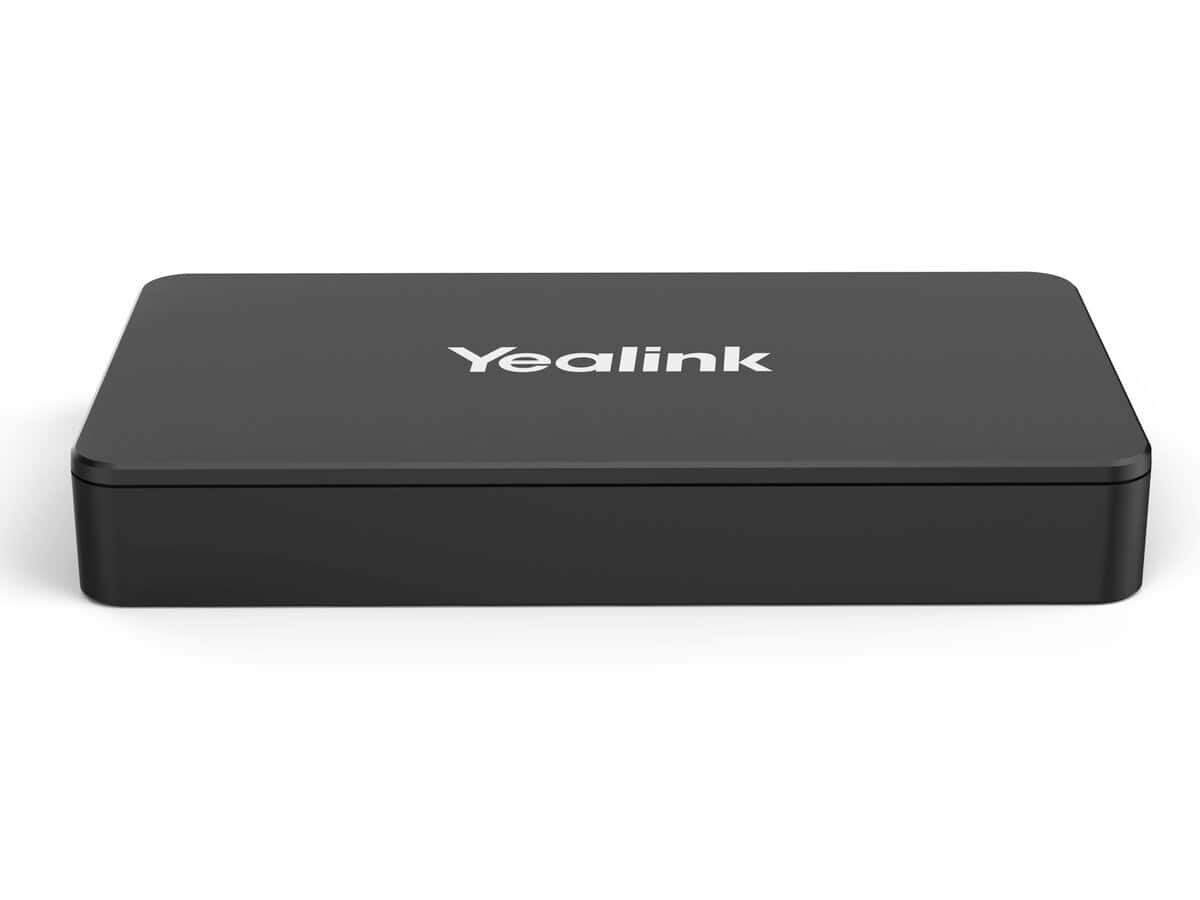

Yealink MShare E2 Wired Content Sharing Adapter

R5524.60

BB Store Credit Earn PreviewEarn approx. R248.61 BB Store Credit1% base • +2% order tier • +1% payday • +0.5% weekend. Added after successful checkout and available for your next order.
Payflex Peach PAYMENTS Yoco
Brits Brothers SupportNeed help with this part?Fitment, stock, courier and returns help.
WhatsApp
Use Sales Desk, or choose a rotating WhatsApp support line.
Premium System

Complete Repair Package

Open the package builder to choose your vehicle and repair area. It only loads after click.

Yealink MShare E2 Wired Content Sharing Adapter offers wired content sharing capabilities for workshops or membership services

Fitment Check
RepairMatch™ Fitment
Confirm this part against your vehicle before you order.
Check Fitment
Opens fitment page
Store Credit Deal
ThunderDeal™ Negotiator
Make a serious online offer and turn the approved value into BB Store Credit.
Open Negotiator
Shortcode page
Repair Package
Complete Repair Bundle
Build a matching repair package using this part as the starting point.
Build Bundle
Opens bundle page
Vehicle Search
Vehicle Parts Finder
Search by vehicle and find related parts faster.
Find Vehicle Parts
Opens finder page

Yealink MShare E2 Wired Content Sharing Adapter is a universal or specification-based automotive item. Compatibility depends on the listed size, fitting, code or use case rather than one fixed vehicle model.

Compare the item against what is currently fitted or required. If the product is cosmetic or accessory-related, make sure the style and application match your intended use.

For a universal or specification-based item, match the size, fitting type, connector, thread, clip style or use case shown in the listing. These items should be bought by specification, not by vehicle name only.

Check the intended location on the vehicle and compare the old item where possible. A universal part can still be wrong if the measurements or fitting style do not match.

Use these listing details while checking this item: Product identity: this part; SKU: BB-395493; Vehicle wording from title: Yealink MShare E2; Category: Workshop Sharing Service or Workshop Membership.

Before payment, compare the listing photos with the old part from more than one angle. Focus on the parts that decide fitment: shape, side, mounting points, plugs, ports, brackets, stamped numbers and any visible trim or facelift differences.

If the vehicle is still assembled, ask for a clear photo of the current part or take one before ordering. A photo check helps avoid buying a similar-looking item that belongs to a different year range, trim level, engine variant or body shape.

Not sure the code, size or specification matches? Use Sox 4 Share – Workshop or Request a Part with a clear photo of the old part before checkout.

Frequently Asked Questions

Confirm fitment before ordering
Quick answers before you order. If anything is unclear, confirm fitment first using your VIN or part number and avoid mistakes.
Helpful product answers
What is the primary function of the Yealink MShare E2 Wired Content Sharing Adapter?
The Yealink MShare E2 is designed to facilitate seamless wired content sharing in meeting rooms or workshops. It allows users to connect their devices directly to a display system, ensuring stable and high-quality transmission of presentations or media without wireless interference.
Which devices are compatible with the Yealink MShare E2 adapter?
This adapter supports a wide range of devices equipped with HDMI output, including laptops and desktops commonly used in professional environments. However, specific compatibility with certain models or operating systems is not specified, so checking your device’s HDMI output capability is recommended.
How do I ensure the Yealink MShare E2 fits into my existing workshop setup?
To confirm fitment, verify that your display or projector has an available HDMI input port to connect the adapter. Additionally, ensure your workspace supports wired connections for optimal performance, as this adapter relies on a physical HDMI link rather than wireless connectivity.
Is the Yealink MShare E2 suitable for Trade Partners offering workshop sharing services?
Yes, the Yealink MShare E2 is ideal for Trade Partners who provide workshop sharing services, as it enhances the reliability and clarity of content sharing during sessions. Its wired connection reduces latency and interference, making it a dependable choice for professional environments.
What should I do if I need a replacement part or additional accessories for the Yealink MShare E2?
If you require replacement parts or accessories, you can submit a request through the Brits Brothers parts service. Visit Request a Part to provide details, and the team will assist you promptly.