
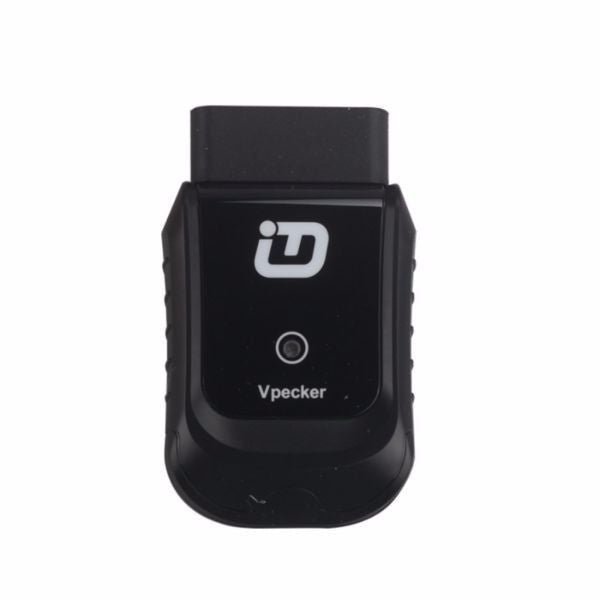
VPECKER Easydiag Wireless OBDII Full Diagnostic Tool V6.4 Support Wifi WINDOWS 10

R4700.00

BB Store Credit Earn PreviewEarn approx. R164.50 BB Store Credit1% base • +2% order tier • +0.5% weekend. Added after successful checkout and available for your next order.
Payflex Peach PAYMENTS Yoco
Brits Brothers SupportNeed help with this part?Fitment, stock, courier and returns help.
WhatsApp
Use Sales Desk, or choose a rotating WhatsApp support line.
Premium System

Complete Repair Package

Open the package builder to choose your vehicle and repair area. It only loads after click.

VPECKER Easydiag Wireless OBDII Full Diagnostic Tool V6.4 Support Wifi WINDOWS 10 provides wireless vehicle diagnostics compatible with Windows 10 systems

Fitment Check
RepairMatch™ Fitment
Confirm this part against your vehicle before you order.
Check Fitment
Opens fitment page
Store Credit Deal
ThunderDeal™ Negotiator
Make a serious online offer and turn the approved value into BB Store Credit.
Open Negotiator
Shortcode page
Repair Package
Complete Repair Bundle
Build a matching repair package using this part as the starting point.
Build Bundle
Opens bundle page
Vehicle Search
Vehicle Parts Finder
Search by vehicle and find related parts faster.
Find Vehicle Parts
Opens finder page

VPECKER Easydiag Wireless OBDII Full Diagnostic Tool V6.4 Support Wifi WINDOWS 10 is a comprehensive diagnostic device designed for vehicle fault detection and troubleshooting via wireless connectivity. This tool interfaces with a vehicle’s OBDII system to read and clear diagnostic trouble codes, monitor live sensor data, and support various diagnostic functions essential for vehicle maintenance and repair.

Intended for use on vehicles equipped with OBDII protocols, the unit connects wirelessly over Wifi and is compatible with Windows 10 systems. Its wireless capability offers convenient and cable-free operation, making it ideal for professional mechanics or DIY enthusiasts seeking an efficient way to diagnose engine and system issues.

When choosing this diagnostic tool, buyers should ensure their vehicle supports OBDII and that they use a compatible Windows 10 device for optimal operation. It is useful for comparing with an existing diagnostic setup or as an upgrade to expand diagnostic scope and accessibility.

  • Wireless OBDII connectivity via Wifi.
  • Designed for Windows 10 compatibility.
  • Full diagnostic capability for engine and emissions systems.

This diagnostic tool helps simplify vehicle issue identification, enabling informed repair decisions. For questions about specific vehicle compatibility or to request parts, contact the sales desk or use the vehicle finder services.

Need help matching this item to your vehicle? Use more Wifi, Vehicle Parts Finder or Request a Part with your VIN, engine number, part number or clear photos.

Frequently Asked Questions

Confirm fitment before ordering
Quick answers before you order. If anything is unclear, confirm fitment first using your VIN or part number and avoid mistakes.
Helpful product answers
Is the VPECKER Easydiag Wireless OBDII compatible with all vehicle makes and models?
The VPECKER Easydiag Wireless OBDII supports a wide range of vehicle makes and models, primarily those equipped with OBDII protocols. However, compatibility may vary depending on the vehicle's year and system. For precise fitment, please consult your vehicle’s manual or contact our Trade Partners for expert advice.
How do I connect the VPECKER Easydiag tool to my Windows 10 device via WiFi?
To connect, first plug the VPECKER Easydiag into your vehicle’s OBDII port. Then, enable WiFi on your Windows 10 device and select the Easydiag network. Open the diagnostic software provided with the tool to establish a connection and begin diagnostics. Ensure your device’s firewall settings allow the software to communicate.
Can the VPECKER Easydiag Wireless OBDII perform full system diagnostics?
Yes, this tool offers full diagnostic capabilities, including reading and clearing fault codes across multiple vehicle systems. It supports comprehensive diagnostics such as engine, transmission, ABS, and airbag systems. This makes it suitable for both professional mechanics and advanced DIY users.
What should I do if the VPECKER Easydiag tool does not connect or respond?
If you experience connection issues, first verify that the device is properly plugged into the OBDII port and that your Windows 10 WiFi is enabled and connected to the Easydiag network. Restart both your vehicle’s ignition and your computer if necessary. For persistent problems, reach out to our Trade Partners or request assistance via our Request a Part service.
Is there any software update support for the VPECKER Easydiag Wireless OBDII tool?
Software updates are essential for maintaining compatibility with new vehicle models and improving diagnostic functions. The VPECKER Easydiag supports updates via WiFi, allowing you to download the latest software directly to the device. Regularly check for updates to ensure optimal performance and access to new features.