
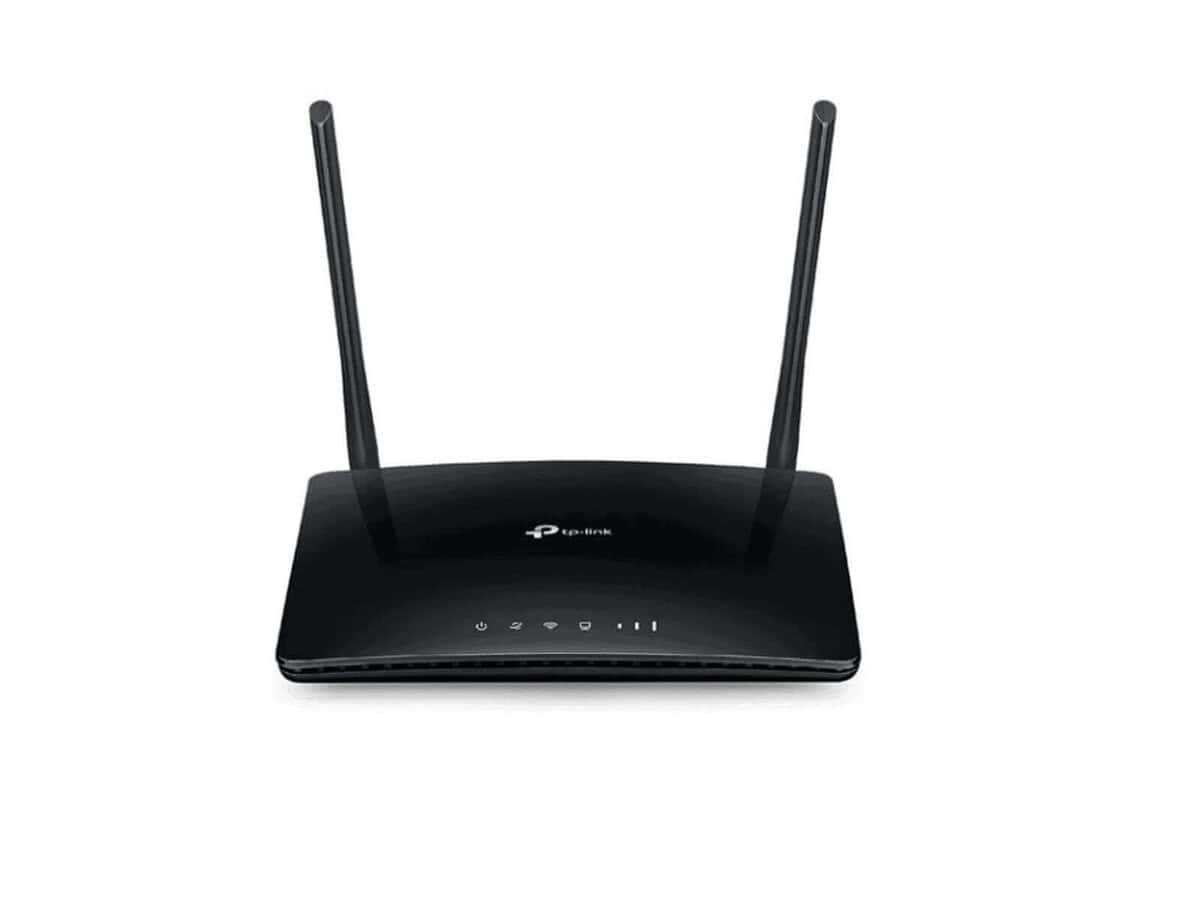


TP-LINK TL-MR6400 4G LTE WIRELESS-N ROUTER – TL-MR6400

R2066.60

BB Store Credit Earn PreviewEarn approx. R51.67 BB Store Credit1% base • +1% payday • +0.5% weekend. Added after successful checkout and available for your next order.
Payflex Peach PAYMENTS Yoco
Brits Brothers SupportNeed help with this part?Fitment, stock, courier and returns help.
WhatsApp
Use Sales Desk, or choose a rotating WhatsApp support line.
Premium System

Complete Repair Package

Open the package builder to choose your vehicle and repair area. It only loads after click.

TP-LINK TL-MR6400 4G LTE WIRELESS-N ROUTER – TL-MR6400 provides 4G LTE wireless internet access and supports Wireless-N standards for network connectivity

Fitment Check
RepairMatch™ Fitment
Confirm this part against your vehicle before you order.
Check Fitment
Opens fitment page
Store Credit Deal
ThunderDeal™ Negotiator
Make a serious online offer and turn the approved value into BB Store Credit.
Open Negotiator
Shortcode page
Repair Package
Complete Repair Bundle
Build a matching repair package using this part as the starting point.
Build Bundle
Opens bundle page
Vehicle Search
Vehicle Parts Finder
Search by vehicle and find related parts faster.
Find Vehicle Parts
Opens finder page

TP-LINK TL-MR6400 4G LTE WIRELESS-N ROUTER – TL-MR6400 is listed as an auto-part option. Confirm fitment, part number and compatibility before purchase, especially where vehicle-specific matching is required.

TP-LINK TL-MR6400 4G LTE WIRELESS-N ROUTER – TL-MR6400 is a wireless networking device designed to provide stable internet connectivity using 4G LTE technology. This router enables wireless access and distribution of mobile broadband internet in homes, small offices, or locations where fixed line internet may not be available or reliable.

The unit connects to a 4G LTE mobile network to deliver wireless internet via the Wireless-N standard, allowing multiple devices to connect simultaneously. It is suitable for setups requiring mobile data access, combining the convenience of cellular connectivity with local wireless networking capabilities.

When considering this router, users should verify compatibility with their existing mobile network provider and assess the wireless range and data speeds required for their specific use. Comparing the device’s specifications with the previous router or network hardware is important to ensure it meets connectivity and performance expectations.

  • Supports 4G LTE broadband internet access
  • Wireless-N for local Wi-Fi connectivity
  • Designed for locations needing mobile internet solutions

For further assistance in selecting compatible networking hardware or if this router does not meet your technical needs, consider consulting the sales desk or submitting a request for an alternative part.

Need help matching this item to your vehicle? Use Logitech K250 Wireless Keyboard, Vehicle Parts Finder or Request a Part with your VIN, engine number, part number or clear photos.

Frequently Asked Questions

Confirm fitment before ordering
Quick answers before you order. If anything is unclear, confirm fitment first using your VIN or part number and avoid mistakes.
Helpful product answers
What are the main connectivity features of the TP-LINK TL-MR6400 4G LTE Wireless-N Router?
The TP-LINK TL-MR6400 supports 4G LTE connectivity, allowing you to use a SIM card for mobile broadband internet access. It also offers Wireless-N technology for Wi-Fi connections, providing reliable wireless networking for your devices. This makes it ideal for locations without fixed-line internet.
Can I use the TL-MR6400 router with any mobile network provider in South Africa?
Yes, the TL-MR6400 is compatible with most South African 4G LTE network providers, as it supports standard SIM cards. However, network coverage and speeds depend on your provider and location. Ensure your SIM card is active and has a data plan to use the router effectively.
How do I set up the TP-LINK TL-MR6400 router for first-time use?
To set up the TL-MR6400, insert your active 4G SIM card into the router, then power it on. Connect your computer or device via Wi-Fi or Ethernet cable, and access the router’s web interface through the default IP address to configure your internet settings. Avoid skipping firmware updates, as outdated software can cause connectivity issues.
What is a common mistake to avoid when using the TL-MR6400 router?
A frequent error is neglecting to secure the router’s Wi-Fi network with a strong password. Leaving it open or with default credentials exposes your network to unauthorized access. Always change the default password during setup to protect your data and bandwidth.
Is the TP-LINK TL-MR6400 suitable for use in a workshop or small office environment?
Yes, the TL-MR6400 is well-suited for workshops or small offices needing reliable 4G internet access without fixed-line infrastructure. Its Wireless-N capabilities support multiple devices simultaneously, making it practical for everyday business tasks. For trade partners requiring bulk orders or technical support, contacting Brits Brothers™ directly is recommended.
Where can I get support or request parts for the TP-LINK TL-MR6400 router?
For support or to request replacement parts, you can reach out to Brits Brothers™ via their dedicated service channels. Use the Request a Part page for specific components or contact their Trade Partners team for assistance. This ensures you receive genuine parts and expert guidance.