
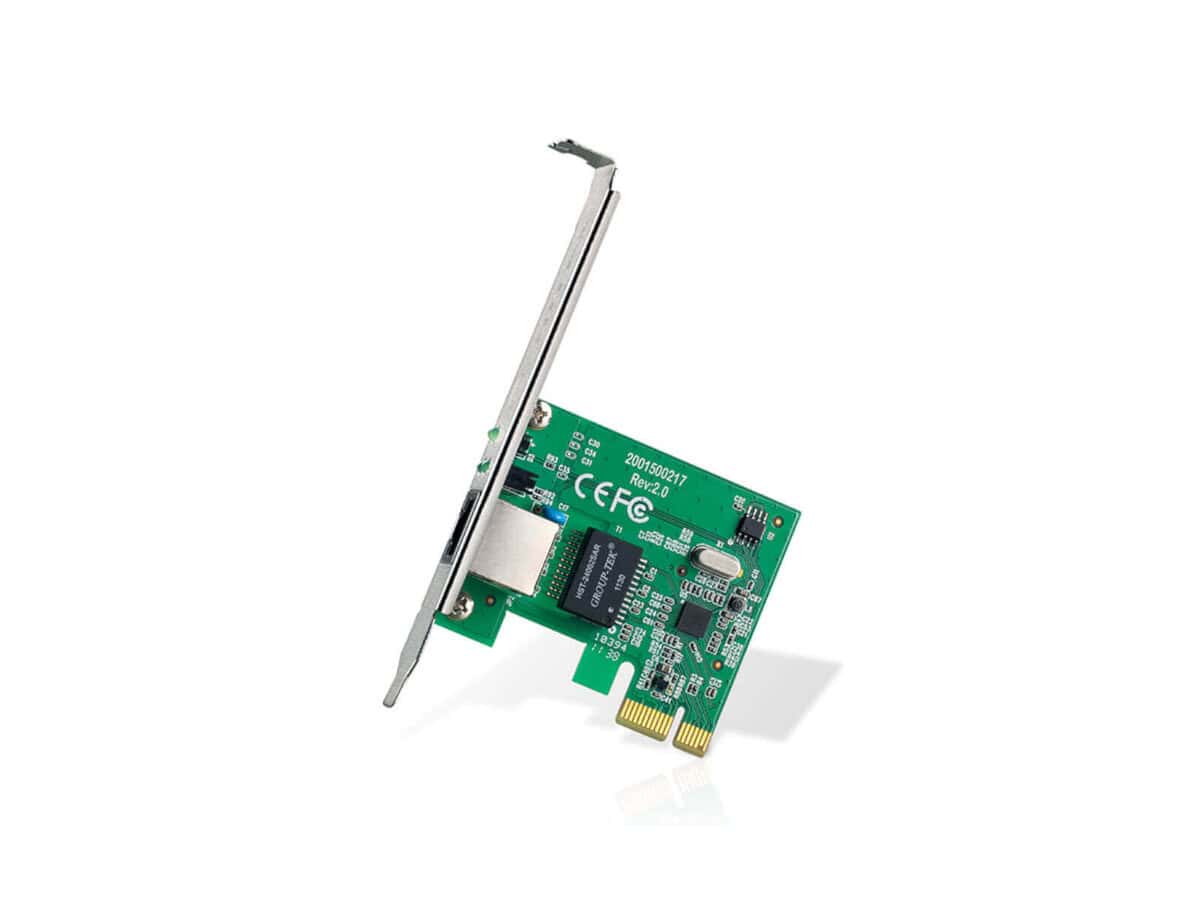

TP-Link TG-3468 Internal Network Card

R442.60

BB Store Credit Earn PreviewEarn approx. R6.64 BB Store Credit1% base • +0.5% weekend. Added after successful checkout and available for your next order.
Payflex Peach PAYMENTS Yoco
Brits Brothers SupportNeed help with this part?Fitment, stock, courier and returns help.
WhatsApp
Use Sales Desk, or choose a rotating WhatsApp support line.
Premium System

Complete Repair Package

Open the package builder to choose your vehicle and repair area. It only loads after click.

TP-Link TG-3468 Internal Network Card is a PCI network card providing wired network connectivity for compatible devices. It fits in standard PCI slots and supports Ethernet connections

Fitment Check
RepairMatch™ Fitment
Confirm this part against your vehicle before you order.
Check Fitment
Opens fitment page
Store Credit Deal
ThunderDeal™ Negotiator
Make a serious online offer and turn the approved value into BB Store Credit.
Open Negotiator
Shortcode page
Repair Package
Complete Repair Bundle
Build a matching repair package using this part as the starting point.
Build Bundle
Opens bundle page
Vehicle Search
Vehicle Parts Finder
Search by vehicle and find related parts faster.
Find Vehicle Parts
Opens finder page

TP-Link TG-3468 Internal Network Card is a component designed to provide wired network connectivity for compatible computer systems. As an internal network card, this unit installs inside the computer case and connects directly to the motherboard to enable Ethernet communication.

This network card typically supports standard Ethernet connections, allowing reliable data transfer and stable network access. It is a useful replacement or upgrade part for desktop PCs or systems requiring a dedicated wired connection, especially where Wi-Fi is unavailable or unstable.

When comparing this card to an old or existing network adapter, confirm the interface type and supported connection speeds on your motherboard or computer. This ensures compatibility and optimal performance for your networking needs. This listing corresponds specifically to the TP-Link TG-3468 model, known for its standard internal network interface.

  • Category: PoE Injector or Network Power Supply related device
  • SKU: BB-395012
  • Intended for use in systems that support PCI interface network cards

For buyers uncertain about match or compatibility, further consultation or submitting a request through the sales support options is advisable to verify fitment with your system before purchasing.

Need help matching this item to your vehicle? Use Ubiquiti EdgePoint PoE Injector, 54VDC, 80W, Vehicle Parts Finder or Request a Part with your VIN, engine number, part number or clear photos.

Frequently Asked Questions

Confirm fitment before ordering
Quick answers before you order. If anything is unclear, confirm fitment first using your VIN or part number and avoid mistakes.
Helpful product answers
What are the key features of the TP-Link TG-3468 Internal Network Card?
The TP-Link TG-3468 is a reliable internal network card designed to provide a stable Gigabit Ethernet connection. It supports 10/100/1000 Mbps speeds, ensuring fast data transfer for desktop PCs. This card is ideal for upgrading older systems to achieve better network performance.
Is the TP-Link TG-3468 compatible with all desktop computers?
This network card fits into a standard PCI Express slot, which is common in most desktop computers. However, compatibility depends on your motherboard having an available PCIe x1 slot. Always check your PC’s specifications before purchasing to ensure proper installation.
Can I use the TP-Link TG-3468 for Power over Ethernet (PoE) applications?
Despite being listed under PoE Injector or Network Power Supply categories, the TG-3468 itself does not provide Power over Ethernet functionality. It is purely a network interface card for data transmission. For PoE needs, consider dedicated PoE injectors or switches.
What is a common mistake when installing the TP-Link TG-3468, and how can I avoid it?
A frequent error is not properly seating the card into the PCIe slot, which can cause the device not to be recognized. To avoid this, power down your PC, open the case carefully, and firmly insert the card until it clicks into place. Double-check connections before closing the case.
Where can Trade Partners find more information or support for the TP-Link TG-3468?
Trade Partners looking for detailed product info or support can visit the Brits Brothers Trade Partner page. This resource offers tailored assistance and access to parts and services. Visit Trade Partners for more details.