
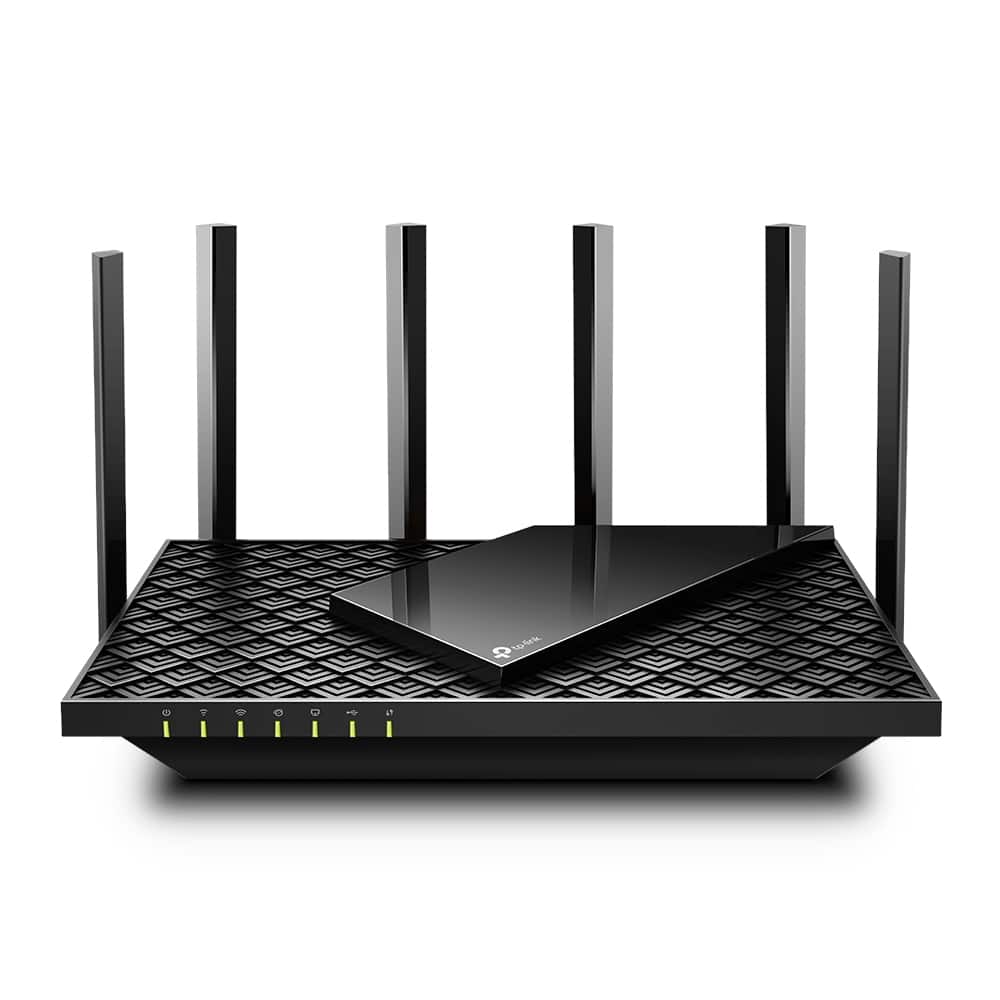

Tp Link Archer AX73 AX5400 Dual Band Wi Fi 6 Router

R3300.00

BB Store Credit Earn PreviewEarn approx. R132.00 BB Store Credit1% base • +2% order tier • +1% payday. Added after successful checkout and available for your next order.
Payflex Peach PAYMENTS Yoco
Fast Product SupportNeed help with this part?Fitment, stock, courier, quote or alternatives — choose the fastest support route.
WhatsApp
Use Live Concierge, or choose a rotating WhatsApp support line.
Premium System

Complete Repair Package

Open the package builder to choose your vehicle and repair area. It only loads after click.

Tp Link Archer AX73 AX5400 Dual Band Wi Fi 6 Router provides high-speed wireless connectivity with dual band Wi Fi 6 technology to support multiple devices efficiently

Fitment Check
RepairMatch™ Fitment
Confirm this part against your vehicle before you order.
Check Fitment
Opens fitment page
Store Credit Deal
ThunderDeal™ Negotiator
Make a serious online offer and turn the approved value into BB Store Credit.
Open Negotiator
Shortcode page
Repair Package
Complete Repair Bundle
Build a matching repair package using this part as the starting point.
Build Bundle
Opens bundle page
Vehicle Search
Vehicle Parts Finder
Search by vehicle and find related parts faster.
Find Vehicle Parts
Opens finder page
Free ShippingNationwide delivery
30-Day ProtectionStore-credit backed
Secure CheckoutYoco / Peach / PayFlex
Verified StockChecked before dispatch

More parts for this vehicle

Selected from similar vehicle and part matches.

Tp Link Archer AX73 AX5400 Dual Band Wi Fi 6 Router is a network device designed for providing advanced wireless connectivity. This router operates on dual bands, enabling simultaneous connections with improved speed and reduced interference, which is essential for optimizing home or office internet performance.

This router is part of the Tp Link Archer series and features Wi-Fi 6 technology, which supports higher data rates and better performance for multiple devices. It is suitable for users looking to upgrade their current wireless setup or replace an existing router that supports standard Wi-Fi protocols. When comparing, check for compatibility with your modem and the needs of your wireless network environment.

The unit’s dual band capability allows for flexible connection options, balancing bandwidth and range depending on your device usage and placement. It is important to match this router to your network demands, including number of users and types of applications you run. This listing is for the model identified as AX73 AX5400, which is recognized for solid general networking purposes under the Tp Link brand.

  • Supports Wi-Fi 6 technology for enhanced wireless performance
  • Dual band operation to reduce network congestion
  • Model suitable for upgrades or replacement in compatible setups

Need help matching this item to your vehicle? Use more General, Vehicle Parts Finder or Request a Part with your VIN, engine number, part number or clear photos.

Frequently Asked Questions

Confirm fitment before ordering
Quick answers before you order. If anything is unclear, confirm fitment first using your VIN or part number and avoid mistakes.
Helpful product answers
What are the key features of the TP Link Archer AX73 AX5400 Dual Band Wi Fi 6 Router?
The TP Link Archer AX73 supports Wi-Fi 6 technology, offering faster speeds and better capacity for multiple devices. It operates on dual bands to reduce interference and improve overall network performance. This router is ideal for high-demand environments like busy homes or small offices.
How do I set up the TP Link Archer AX73 router for optimal performance?
Start by connecting the router to your modem and powering it on. Access the router’s web interface via the default IP address and follow the setup wizard to configure your Wi-Fi settings. Avoid placing the router near metal objects or thick walls to prevent signal loss and ensure better coverage throughout your space.
Can this router handle multiple devices simultaneously without slowing down?
Yes, the Archer AX73 is designed with Wi-Fi 6 technology, which improves network efficiency and capacity. It can manage multiple devices streaming, gaming, or working online at the same time without significant speed drops. This makes it a solid choice for busy households or small offices with many connected gadgets.
Is the TP Link Archer AX73 compatible with older Wi-Fi devices?
The Archer AX73 supports backward compatibility, meaning it works with older Wi-Fi standards such as Wi-Fi 5 and Wi-Fi 4. This ensures your existing devices can connect without issues while you benefit from the improved performance of Wi-Fi 6 on newer devices.
What is a common mistake to avoid when installing this router?
A frequent error is placing the router in a low or enclosed space, which can severely limit signal reach. To fix this, position the router in a central, elevated location away from obstructions like thick walls or electronic appliances. This simple adjustment maximizes coverage and network stability.
Where can Trade Partners get support or order parts for this router?
Trade Partners can request parts or support through the dedicated parts request portal. For specific part inquiries or assistance, visit Request a Part. This ensures quick access to genuine components and expert help.