
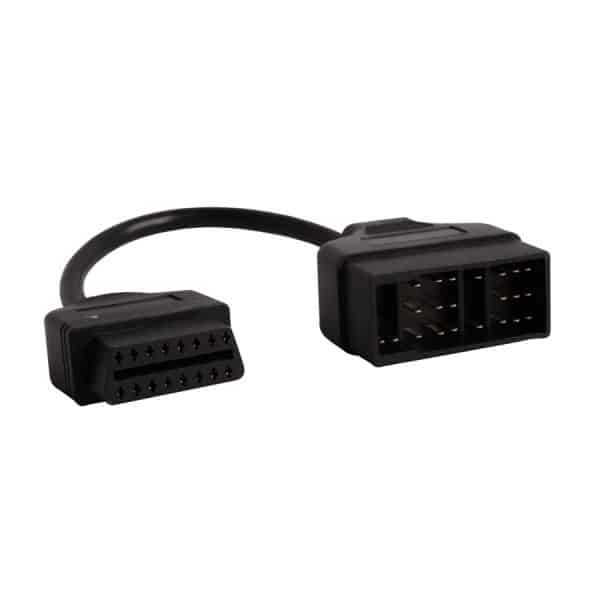
Toyota 22 Pin To OBDII 16 Connector

R421.70

BB Store Credit Earn PreviewEarn approx. R4.22 BB Store Credit1% base. Added after successful checkout and available for your next order.
Payflex Peach PAYMENTS Yoco
Brits Brothers SupportNeed help with this part?Fitment, stock, courier and returns help.
Click any service to learn more.
Repair package

Complete Repair Package

Open the package builder to choose your vehicle and repair area. It only loads after click.

Toyota 22 Pin To OBDII 16 Connector enables connection from a Toyota 22 Pin diagnostic port to a standard OBDII 16 pin interface for vehicle diagnostics

Toyota 22 Pin To OBDII 16 Connector is a specialized automotive diagnostic tool designed to interface between the Toyota 22 Pin diagnostic port and the standardized OBDII 16-pin connector. This adapter enables communication between Toyota vehicles equipped with the 22-pin diagnostic socket and modern OBDII diagnostic devices, facilitating vehicle diagnostics, troubleshooting, and data retrieval.

This connector is essential when servicing or diagnosing a Toyota vehicle with the older 22-pin diagnostic interface using contemporary OBDII scan tools. The buyer should compare their vehicle’s diagnostic port configuration to ensure compatibility with the 22-pin side of this adapter. It allows connection to the widely adopted 16-pin OBDII diagnostic cable, making it easier to read fault codes and perform vehicle health checks.

When selecting this adapter, verify that your Toyota vehicle requires a 22-pin to 16-pin conversion, as the product is targeted specifically at this diagnostic interface. Using the correct connector ensures reliable data transmission and proper tool communication during diagnostics.

  • Adapter converts Toyota 22-pin diagnostic port to OBDII 16-pin
  • Compatible with diagnostic tools using standard OBDII connections
  • SKU: BB-291772, suitable for Toyota vehicles with 22-pin diagnostic sockets

For further details or if your vehicle’s diagnostic needs differ, consider contacting the sales desk or submitting a request for the correct part.

Need help matching this item to your vehicle? Use more OBDII Connectors & Automotive, Vehicle Parts Finder or Request a Part with your VIN, engine number, part number or clear photos.

Frequently Asked Questions

Confirm fitment before ordering
Quick answers before you order. If anything is unclear, confirm fitment first using your VIN or part number and avoid mistakes.
Helpful product answers
What is the purpose of the Toyota 22 Pin to OBDII 16 Connector?
This connector is designed to adapt Toyota vehicles with a 22-pin diagnostic port to the standard OBDII 16-pin interface. It allows diagnostic tools that use the OBDII format to communicate with Toyota vehicles that have the older 22-pin connector, facilitating vehicle diagnostics and troubleshooting.
Is the Toyota 22 Pin to OBDII 16 Connector compatible with all Toyota models?
Compatibility depends on the vehicle's diagnostic port type. This adapter specifically works with Toyota models equipped with a 22-pin diagnostic connector. For vehicles with different connector types, this adapter may not be suitable. Always verify your vehicle's diagnostic port before purchasing.
Can I use this connector with any OBDII diagnostic tool?
Yes, this adapter enables the use of standard OBDII diagnostic tools with Toyota vehicles that have a 22-pin connector. It bridges the connection between the vehicle's port and the diagnostic device, ensuring proper communication for diagnostics and data retrieval.
Where can Trade Partners find more information or request this product?
Trade Partners interested in this connector can visit the Brits Brothers website or contact the team directly. For specific inquiries or to request parts, use the Request a Part page or reach out via WhatsApp at https://wa.me/27735925563.
Is there any warranty or return policy for this connector?
Warranty and return policies are not specified for this product. For details on refunds or returns, customers should refer to Brits Brothers' official Refunds page or contact customer support for assistance.