
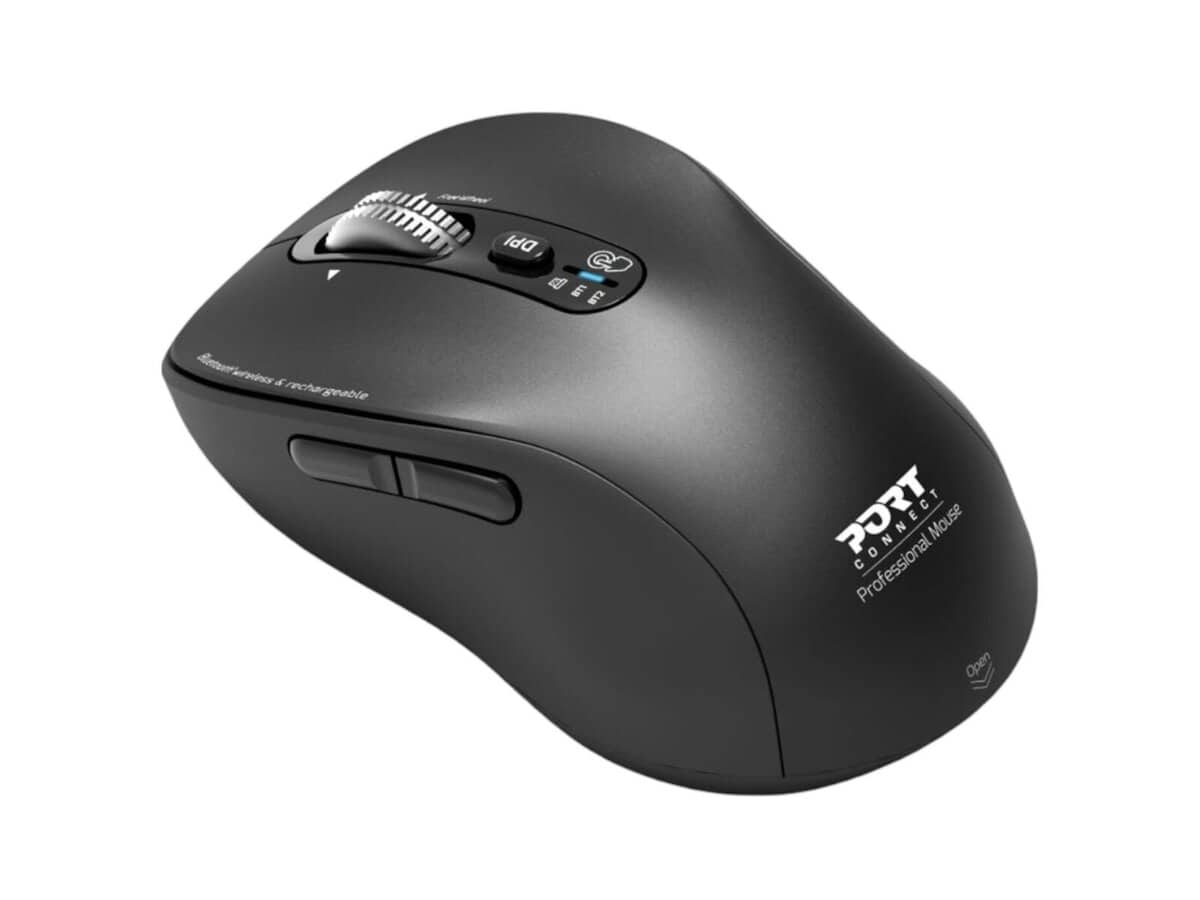
Port Connect Expert Wireless Bluetooth Mouse

R736.60

BB Store Credit Earn PreviewEarn approx. R18.42 BB Store Credit1% base • +1% payday • +0.5% weekend. Added after successful checkout and available for your next order.
Payflex Peach PAYMENTS Yoco
Brits Brothers SupportNeed help with this part?Fitment, stock, courier and returns help.
WhatsApp
Use Sales Desk, or choose a rotating WhatsApp support line.
Premium System

Complete Repair Package

Open the package builder to choose your vehicle and repair area. It only loads after click.

Port Connect Expert Wireless Bluetooth Mouse offers wireless connectivity via Bluetooth, suitable for various computing needs

Fitment Check
RepairMatch™ Fitment
Confirm this part against your vehicle before you order.
Check Fitment
Opens fitment page
Store Credit Deal
ThunderDeal™ Negotiator
Make a serious online offer and turn the approved value into BB Store Credit.
Open Negotiator
Shortcode page
Repair Package
Complete Repair Bundle
Build a matching repair package using this part as the starting point.
Build Bundle
Opens bundle page
Vehicle Search
Vehicle Parts Finder
Search by vehicle and find related parts faster.
Find Vehicle Parts
Opens finder page

Port Connect Expert Wireless Bluetooth Mouse is a computer peripheral designed for wireless connectivity via Bluetooth. This mouse allows users to navigate their devices without the constraints of a wired connection, enhancing mobility and ease of use.

The mouse functions by connecting to devices equipped with Bluetooth capability, making it ideal for a variety of setups where convenience and clutter-free operation are priorities. When considering this replacement or upgrade, buyers should verify that their device supports Bluetooth connectivity to ensure compatibility with this particular model.

Key considerations when choosing this mouse include comparing the current peripheral’s connection type and ensuring it aligns with Bluetooth standards. This product is listed under the category Computer Peripheral or Wireless Mouse and carries the SKU BB-395917.

  • Wireless Bluetooth connection for ease of use
  • Compatible with devices supporting Bluetooth input
  • SKU for reference: BB-395917

For those requiring further assistance or specific inquiries, consulting a sales desk or submitting a request for parts can offer additional guidance to match this mouse with user needs or specific setups.

Need help matching this item to your vehicle? Use Logitech K250 Wireless Keyboard, Vehicle Parts Finder or Request a Part with your VIN, engine number, part number or clear photos.

Frequently Asked Questions

Confirm fitment before ordering
Quick answers before you order. If anything is unclear, confirm fitment first using your VIN or part number and avoid mistakes.
Helpful product answers
Is the Port Connect Expert Wireless Bluetooth Mouse compatible with all laptops and desktops?
The Port Connect Expert Wireless Bluetooth Mouse is designed to work with most devices that support Bluetooth connectivity, including laptops, desktops, and tablets. However, compatibility depends on your device's Bluetooth version and operating system. For best results, ensure your device supports Bluetooth 4.0 or higher.
How do I pair the Port Connect Expert Wireless Bluetooth Mouse with my computer?
To pair the mouse, turn it on and enable Bluetooth on your computer. Search for new Bluetooth devices and select 'Port Connect Expert' from the list. Once connected, the mouse should work immediately without needing additional drivers. If you encounter issues, restarting your device can help.
What is the battery life like on the Port Connect Expert Wireless Bluetooth Mouse?
Battery life details are not specified, but wireless Bluetooth mice typically offer several weeks of use on a single charge or set of batteries. To maximize battery life, turn off the mouse when not in use and avoid leaving it on continuously. Check the product packaging or contact Trade Partners for more precise information.
Can I use the Port Connect Expert Wireless Bluetooth Mouse on different surfaces?
Yes, this mouse is designed to perform well on a variety of surfaces such as desks, mouse pads, and even some textured surfaces. For optimal tracking and responsiveness, using a mouse pad is recommended. Avoid reflective or glass surfaces as they may affect sensor accuracy.
What should I do if my Port Connect Expert Wireless Bluetooth Mouse stops connecting?
If connection issues arise, first ensure the mouse has sufficient battery power and is within range of your device. Try re-pairing the mouse by removing it from your Bluetooth devices list and connecting again. For further assistance, reach out to our Trade Partners or use our Request a Part service.