
OBD2 Bluetooth Auto Scanner Trouble Code

R800.00

BB Store Credit Earn PreviewEarn approx. R20.00 BB Store Credit1% base • +1% payday • +0.5% weekend. Added after successful checkout and available for your next order.
Payflex Peach PAYMENTS Yoco
Brits Brothers SupportNeed help with this part?Fitment, stock, courier and returns help.
WhatsApp
Use Sales Desk, or choose a rotating WhatsApp support line.
Premium System

Complete Repair Package

Open the package builder to choose your vehicle and repair area. It only loads after click.

OBD2 Bluetooth Auto Scanner Trouble Code is an electronic or sensor part. Match the part number, plug layout and system compatibility before purchase

Fitment Check
RepairMatch™ Fitment
Confirm this part against your vehicle before you order.
Check Fitment
Opens fitment page
Store Credit Deal
ThunderDeal™ Negotiator
Make a serious online offer and turn the approved value into BB Store Credit.
Open Negotiator
Shortcode page
Repair Package
Complete Repair Bundle
Build a matching repair package using this part as the starting point.
Build Bundle
Opens bundle page
Vehicle Search
Vehicle Parts Finder
Search by vehicle and find related parts faster.
Find Vehicle Parts
Opens finder page

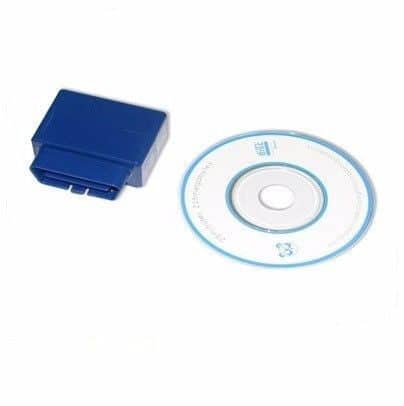
OBD2 Bluetooth Auto Scanner Trouble Code is an electronic module designed to interface with a vehicle’s onboard diagnostics system via Bluetooth. This device connects wirelessly to compatible vehicles equipped with OBD2 ports, enabling users to scan and retrieve trouble codes that indicate potential issues with the engine and other vehicle systems.

This module acts as a diagnostic tool that helps identify fault codes stored in the vehicle’s computer. When plugged into the OBD2 port, it communicates with the vehicle’s ECU and transmits data to a smartphone or tablet application. Users can read these codes to understand what might be causing warning lights on the dashboard, making it an essential part for troubleshooting and vehicle maintenance.

Buyers should compare this unit with their existing diagnostic equipment to ensure compatibility with the Bluetooth function and OBD2 interface. It is important to note that this listing does not guarantee coding, calibration, or automated fault repairs, so it serves primarily as an information retrieval tool.

  • Part type: module for OBD2 Bluetooth Auto diagnostics
  • Brand: Unknown Brand
  • SKU: BB-258579

Need help matching this item to your vehicle? Use more Bluetooth Module, Vehicle Parts Finder or Request a Part with your VIN, engine number, part number or clear photos.

Frequently Asked Questions

Confirm fitment before ordering
Quick answers before you order. If anything is unclear, confirm fitment first using your VIN or part number and avoid mistakes.
Helpful product answers
What vehicles are compatible with the OBD2 Bluetooth Auto Scanner Trouble Code?
This OBD2 Bluetooth Auto Scanner is designed to work with most vehicles manufactured after 1996 that support the OBD2 protocol. It connects via Bluetooth to smartphones or tablets for diagnostics. However, compatibility may vary depending on the vehicle make and model, so checking your vehicle’s OBD2 support is recommended before purchase.
How do I connect the OBD2 Bluetooth Auto Scanner to my smartphone?
Simply plug the scanner into your vehicle’s OBD2 port, usually located under the dashboard. Then, enable Bluetooth on your smartphone and pair it with the scanner. You will need a compatible app to read and clear trouble codes, which can often be found on your app store or recommended by the product instructions.
Can this scanner clear trouble codes or just read them?
The OBD2 Bluetooth Auto Scanner can both read and clear trouble codes from your vehicle’s engine control unit. This allows you to diagnose issues and reset the check engine light after repairs. Always ensure the problem is fixed before clearing codes to avoid masking ongoing issues.
Is the OBD2 Bluetooth Auto Scanner suitable for Trade Partners?
Yes, this scanner is a practical tool for Trade Partners who require efficient vehicle diagnostics. It supports quick troubleshooting and can enhance service delivery. For Trade Partners interested in bulk purchases or special terms, visiting our Trade Partners page is advised.
What should I do if the scanner does not connect or read codes properly?
If you experience connection issues, first ensure your vehicle’s ignition is on and the scanner is properly plugged in. Check that your smartphone’s Bluetooth is active and paired with the device. Restarting the app or your phone can help. For persistent problems, contacting support via WhatsApp at https://wa.me/27735925563 is recommended.