
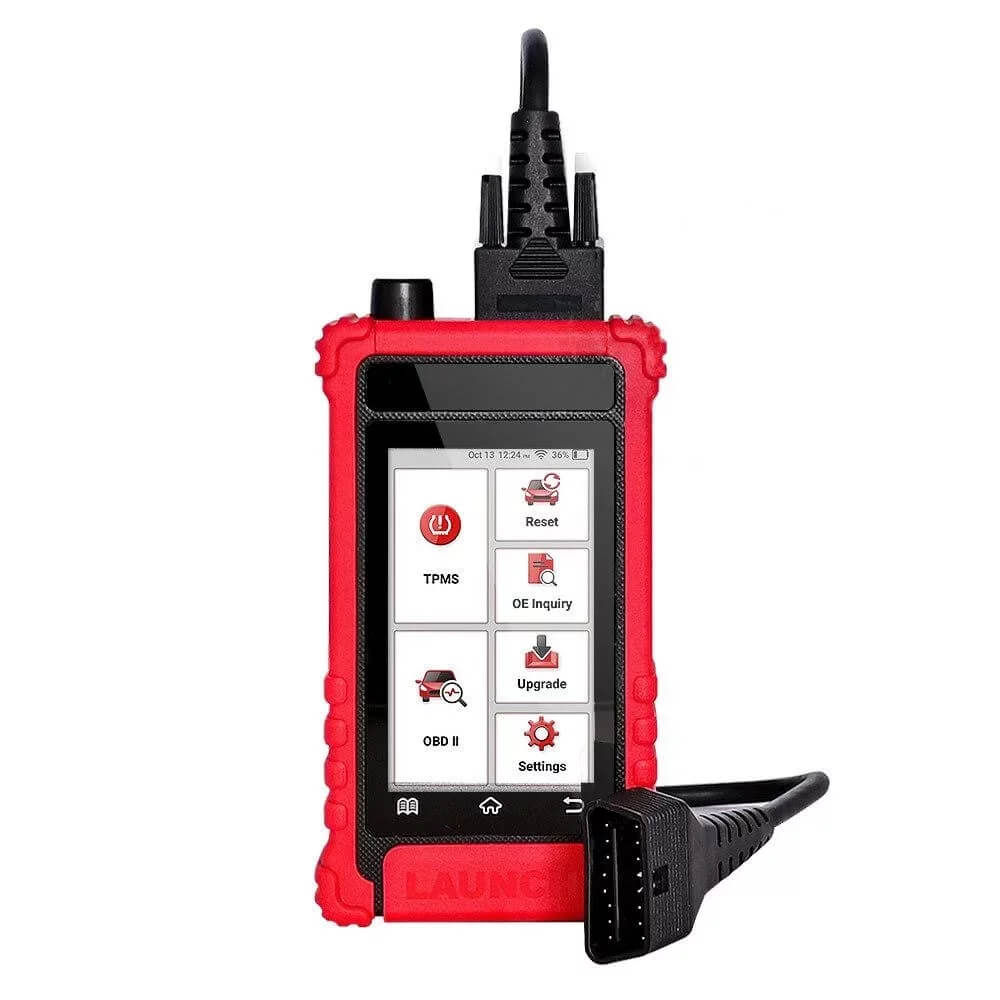
Launch CRT 511S TPMS Tool OBDII Scanner, Sensor Programmer & Relearn

R5714.00

BB Store Credit Earn PreviewEarn approx. R171.42 BB Store Credit1% base • +2% order tier. Added after successful checkout and available for your next order.
Payflex Peach PAYMENTS Yoco
Brits Brothers SupportNeed help with this part?Fitment, stock, courier and returns help.
Click any service to learn more.
Repair package

Complete Repair Package

Open the package builder to choose your vehicle and repair area. It only loads after click.

Launch CRT 511S TPMS Tool OBDII Scanner Sensor Programmer & Relearn is an electronic or sensor part. Match the part number, plug layout and system compatibility before purchase

Launch CRT 511S TPMS Tool OBDII Scanner Sensor Programmer & Relearn is listed as an auto-part option. Confirm fitment, part number and compatibility before purchase, especially where vehicle-specific matching is required.

Launch CRT 511S TPMS Tool OBDII Scanner, Sensor Programmer & Relearn is a specialized sensor tool designed for automotive diagnostic and programming tasks. This unit primarily interfaces with a vehicle’s Tire Pressure Monitoring System (TPMS) to scan, program, and relearn sensor information via the OBDII port.

This tool helps identify, activate, and program TPMS sensors, allowing communication between the vehicle’s control module and individual tire sensors. It is especially useful for technicians managing TPMS sensors during tire changes, sensor replacements, or system resets. The device can scan for sensor IDs and relearn them to the vehicle’s system, facilitating maintenance and troubleshooting efforts.

Buyers should compare this tool’s compatibility by the exact model name “Launch CRT 511S” and its TPMS-focused OBDII functions. While the tool covers key sensor programming tasks, coding, calibration, and fault repairs are not guaranteed by this product listing. It is recommended to verify vehicle compatibility and confirm the required sensor protocols before purchase.

  • Supports TPMS sensor scanning and programming
  • Connects via OBDII for sensor relearn functions
  • Suitable for technicians handling sensor maintenance and replacements

Need help matching this item to your vehicle? Use more Tools, Vehicle Parts Finder or Request a Part with your VIN, engine number, part number or clear photos.

Frequently Asked Questions

Confirm fitment before ordering
Quick answers before you order. If anything is unclear, confirm fitment first using your VIN or part number and avoid mistakes.
Helpful product answers
What is the primary function of the Launch CRT 511S TPMS Tool OBDII Scanner?
The Launch CRT 511S is designed to scan and diagnose TPMS (Tire Pressure Monitoring System) sensors and OBDII codes. It helps identify sensor faults and allows for sensor programming and relearning, ensuring your vehicle’s TPMS operates correctly. This tool is essential for maintaining accurate tire pressure monitoring and vehicle safety.
Can the Launch CRT 511S program new TPMS sensors?
Yes, the Launch CRT 511S can program new TPMS sensors to your vehicle’s system. This feature is useful when replacing faulty sensors or installing aftermarket sensors. Proper programming ensures the sensors communicate correctly with the vehicle’s ECU, preventing warning lights and ensuring accurate pressure readings.
Is the Launch CRT 511S compatible with all vehicle makes and models?
Compatibility varies depending on the vehicle’s make, model, and year. While the tool supports a wide range of vehicles with OBDII and TPMS systems, it’s best to check specific compatibility before purchase. For detailed inquiries, Trade Partners can contact Brits Brothers™ directly for support and compatibility confirmation.
How do I perform a TPMS sensor relearn using this tool?
To perform a TPMS sensor relearn, connect the Launch CRT 511S to the vehicle’s OBDII port and follow the on-screen prompts to activate the relearn procedure. This process synchronizes the sensors with the vehicle’s ECU after sensor replacement or rotation. A common mistake is skipping the relearn step after sensor changes, which can cause incorrect pressure readings; always complete the relearn to ensure proper function.
What should I do if the Launch CRT 511S does not detect a sensor?
If the tool fails to detect a sensor, first check the sensor’s battery and signal strength as weak batteries can cause detection issues. Ensure the vehicle ignition is on and the tool is properly connected. If problems persist, consult the user manual or reach out to Brits Brothers™ Trade Partners for technical assistance to avoid misdiagnosis.
Where can I get support or replacement parts for the Launch CRT 511S?
For support or to request replacement parts, you can contact Brits Brothers™ through their dedicated parts request page. They offer assistance tailored to Trade Partners and end-users to keep your tool operational. Visit Request a Part for more information and to submit your request.