

Konnwei KW680 Diagnostic Scan Tool (OBDII Engine Codes & Live Data)

R995.00

BB Store Credit Earn PreviewEarn approx. R9.95 BB Store Credit1% base. Added after successful checkout and available for your next order.
Payflex Peach PAYMENTS Yoco
Brits Brothers Support

Need help with this part?

Fitment, stock, courier and returns help.
Click any service to learn more.
Repair package

Complete Repair Package

Open the package builder to choose your vehicle and repair area. It only loads after click.

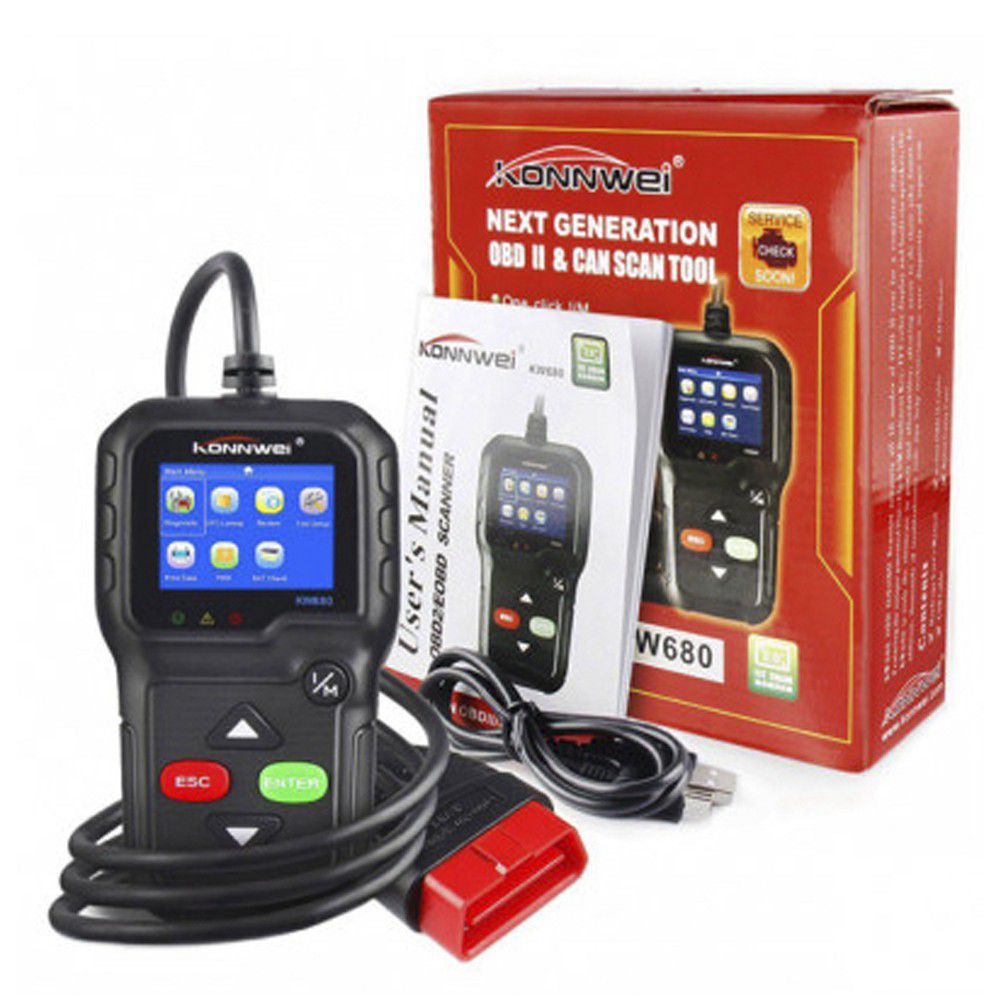
Konnwei KW680 Diagnostic Scan Tool (OBDII Engine Codes & Live Data) offers engine code reading and live data display for vehicle diagnostics

Konnwei KW680 Diagnostic Scan Tool (OBDII Engine Codes & Live Data) is listed as an auto-part option. Confirm fitment, part number and compatibility before purchase, especially where vehicle-specific matching is required.

this part is a mechanical diagnostic device designed to read OBDII engine codes and display live data. This tool helps identify engine issues by retrieving diagnostic trouble codes from the vehicle’s OBDII system, offering essential insights into engine performance and faults.

This scan tool supports vehicles equipped with standard OBDII systems, making it suitable for troubleshooting engine faults and checking real-time sensor data. Users typically compare the fault codes displayed by the unit against the vehicle’s diagnostic manual or service guide to confirm the cause of engine warning lights or performance issues.

The unit provides valuable live data feeds, allowing mechanics and owners to monitor sensor outputs and other engine parameters while the vehicle is running. This functionality aids in comprehensive diagnostics beyond just error codes, supporting more accurate fault detection.

  • Reads OBDII engine codes for fault identification
  • Displays live engine data for real-time monitoring
  • Compatible with OBDII-equipped vehicles

When considering this scan tool, compare it with your current diagnostic device or the vehicle’s OBDII requirements. If unsure about specific functionalities or compatibility, consult the sales desk or submit a request for part support.

If this repair may need matching clips, brackets, lights, panels or more than one part, check more Engine, Quick Repair Bundle or Request a Part before ordering.

Frequently Asked Questions

Confirm fitment before ordering
Quick answers before you order. If anything is unclear, confirm fitment first using your VIN or part number and avoid mistakes.
Helpful product answers
What vehicles are compatible with the Konnwei KW680 Diagnostic Scan Tool?
The Konnwei KW680 supports all OBDII-compliant vehicles, typically those manufactured from 1996 onwards. It works with petrol and diesel engines that adhere to OBDII protocols. For specific model compatibility, please consult your vehicle’s manual or contact our Trade Partners for detailed advice.
Can the KW680 read live engine data and what parameters does it display?
Yes, the KW680 provides live data streaming including engine RPM, coolant temperature, fuel system status, and oxygen sensor readings. This real-time information helps diagnose engine performance issues effectively. It’s ideal for both professional mechanics and DIY enthusiasts seeking detailed engine insights.
How do I ensure the KW680 scan tool fits my vehicle’s OBDII port?
The KW680 is designed with a standard 16-pin OBDII connector compatible with most vehicles. Locate your vehicle’s OBDII port, usually under the dashboard near the steering column, and check if the connector matches. If unsure, our Trade Partners can assist with fitment verification.
Does the Konnwei KW680 support clearing engine fault codes?
Yes, the KW680 can read and clear diagnostic trouble codes (DTCs) from your vehicle’s engine control unit. Clearing codes helps reset the check engine light after repairs. However, if the issue persists, the light may reappear, indicating further diagnosis is needed.
Is there a warranty or return policy for the KW680 scan tool?
Warranty details are not specified for this product. For returns or refunds, please refer to our official refund policy available at Refunds. Contact our customer support or Trade Partners for assistance with any issues post-purchase.