
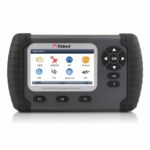
Konnwei KW310 Diagnostic Scan Tool (OBD2 Engine Codes & Live Data)

R720.70

BB Store Credit Earn PreviewEarn approx. R7.21 BB Store Credit1% base. Added after successful checkout and available for your next order.
Payflex Peach PAYMENTS Yoco
Brits Brothers Support

Need help with this part?

Fitment, stock, courier and returns help.
Click any service to learn more.
Repair package

Complete Repair Package

Open the package builder to choose your vehicle and repair area. It only loads after click.

Konnwei KW310 Diagnostic Scan Tool (OBD2 Engine Codes & Live Data) offers vehicle diagnostics including reading engine codes and live data streams useful for troubleshooting

Konnwei KW310 Diagnostic Scan Tool (OBD2 Engine Codes & Live Data) is listed as an auto-part option. Confirm fitment, part number and compatibility before purchase, especially where vehicle-specific matching is required.

this part is a handheld device designed to interface with a vehicle’s onboard diagnostic system to read engine codes and display live data. It helps identify issues by retrieving fault codes stored in the engine control unit, providing an essential step in diagnosing engine problems.

This diagnostic scan tool is compatible with vehicles supporting the OBD2 standard, enabling you to access engine parameters in real time. Using this unit, you can monitor operating conditions, sensor outputs, and other vital engine information to assist in troubleshooting and maintenance decisions.

When comparing this tool to your current diagnostic equipment, check that your vehicle requires an OBD2 interface and that the functions offered match your diagnostic needs. The tool’s brand, Konnwei, is identified clearly in the product title and SKU BB-289585, helping buyers ensure they are selecting the correct model.

  • Reads and clears engine fault codes
  • Displays live engine data for troubleshooting
  • Compact and portable design for convenience

This scan tool is aimed at professional mechanics and DIYers who require reliable engine diagnostics. For questions on specific vehicle compatibility or additional features, consider consulting the Sales Desk or submitting a Request a Part inquiry.

If this repair may need matching clips, brackets, lights, panels or more than one part, check more Engine, Quick Repair Bundle or Request a Part before ordering.

Frequently Asked Questions

Confirm fitment before ordering
Quick answers before you order. If anything is unclear, confirm fitment first using your VIN or part number and avoid mistakes.
Helpful product answers
What vehicles are compatible with the Konnwei KW310 Diagnostic Scan Tool?
The Konnwei KW310 is designed to work with most vehicles that support the OBD2 protocol, typically cars and light trucks manufactured after 1996. It reads engine codes and live data from the vehicle's ECU. However, compatibility may vary with some models, so checking your vehicle's OBD2 compliance before purchase is recommended.
How do I interpret the engine codes displayed by the KW310?
The KW310 displays standard OBD2 trouble codes which indicate specific issues with your vehicle's engine or emissions system. Each code corresponds to a fault that can be looked up in the user manual or online databases. Avoid the common mistake of ignoring the codes; instead, use them to guide repairs or diagnostics accurately.
Can the KW310 display live data while the engine is running?
Yes, the KW310 provides real-time live data such as engine RPM, coolant temperature, and oxygen sensor readings. This feature helps in monitoring engine performance and diagnosing intermittent problems. Make sure the engine is running and the scan tool is properly connected to get accurate live data.
Is the Konnwei KW310 suitable for professional mechanics or just DIY users?
The KW310 is a versatile tool suitable for both DIY enthusiasts and Trade Partners who need quick diagnostics. While it offers essential engine code reading and live data, it may lack advanced features found in professional-grade scanners. For detailed diagnostics, professionals might use it as a preliminary tool before deeper analysis.
What should I do if the KW310 does not communicate with my vehicle?
If the KW310 fails to connect, first ensure the vehicle's ignition is on and the OBD2 port is accessible. A common mistake is not fully inserting the scan tool into the port; check the connection firmly. If problems persist, verify vehicle compatibility or consult Trade Partners for assistance. For part requests or support, visit Request a Part.