
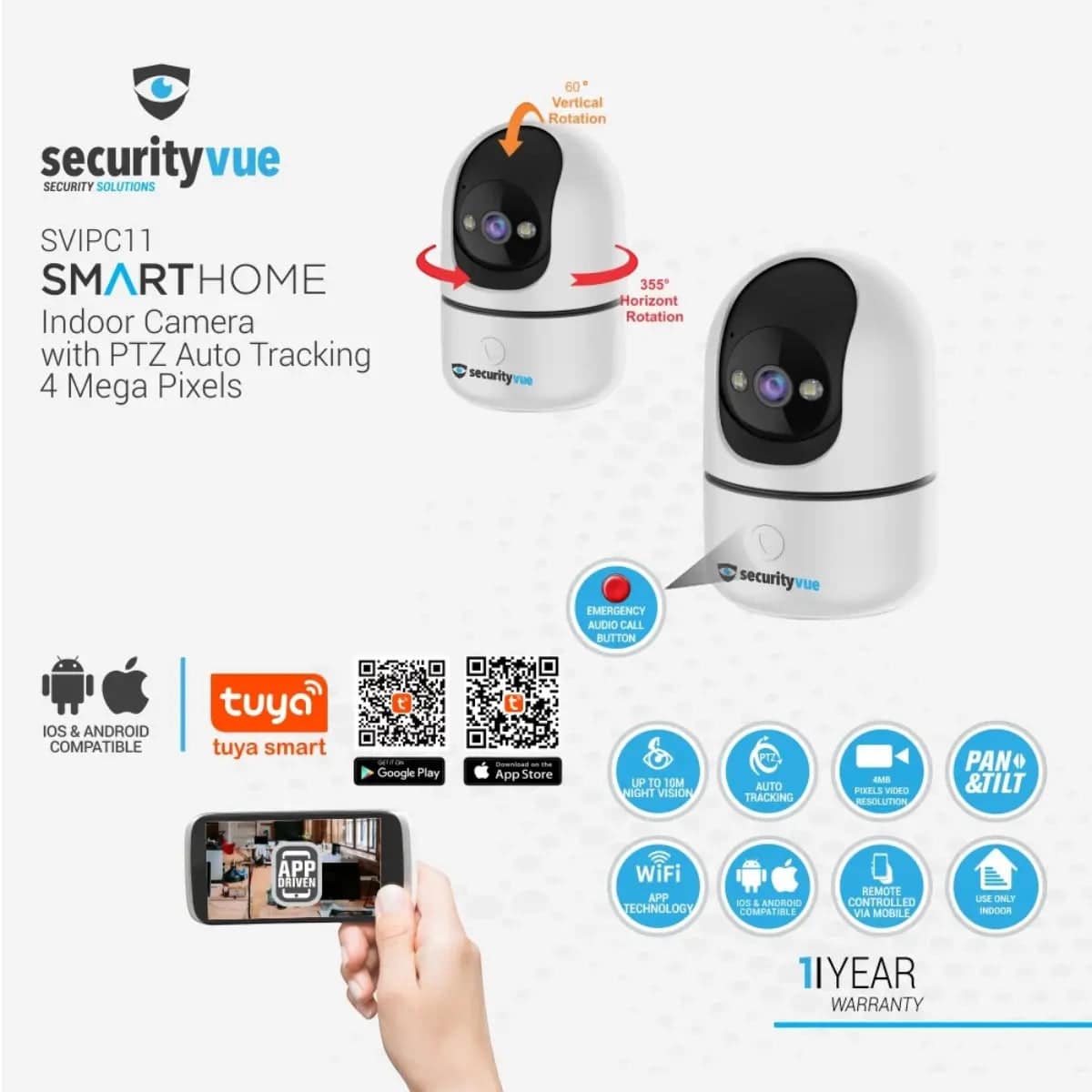

Gentech Securityvue Smarthome Indoor Security Camera
Enhance your home security with cutting-edge technology designed for peace of mind. The Gentech Securityvue Smarthome Indoor Security Camera offers seamless monitoring, smart integrations, and crystal-clear video quality to keep your loved ones and valuables safe.
Product Highlights
- Full HD 1080p video resolution for sharp, detailed monitoring
- Smartphone app integration for live streaming and alerts
- Motion detection with customizable zones to minimize false alarms
- Two-way audio to communicate through the camera
- Night vision capability for 24/7 surveillance
- Compact and sleek design for easy indoor placement
- Compatible with common smart home ecosystems (Confirm fitment)
Condition & What You Get
This listing is for a Gentech Securityvue Smarthome Indoor Security Camera sold in new condition unless otherwise stated. Each unit undergoes strict quality checks to ensure flawless operation and reliability.
What’s included:
- One (1) Gentech Securityvue Smarthome Indoor Security Camera
- Power adapter & cable
- Mounting accessories for indoor use
- Quick start guide & warranty card
Shipping & Returns – Your Trust Matters
We partner with trusted courier services such as The Courier Guy to ensure your order arrives safely and on time.
Shipping is fast and reliable. You will receive tracking details promptly after your order is dispatched.
Returns are easy and hassle-free. For full return policies and procedures, please visit our Refund & Returns page.
Technical & Fitment Snapshot
| Feature | Specification |
|---|---|
| Video Resolution | 1080p Full HD |
| Connectivity | Wi-Fi (Typical/Common) – Confirm fitment |
| Power Supply | AC Adapter (Included) |
| Night Vision | Infrared LED |
| Audio | Two-way Talk |
| Smart Home Compatibility | Common Platforms (Typical/Common) – Confirm fitment |
Have Questions? Contact Us via WhatsApp
Need more information or want to confirm availability? Chat with our parts experts directly via WhatsApp.
Get the Brits Brothers™ App for Smooth Shopping

Discover the convenience of buying vehicle parts and security devices right from your mobile device. Download the app today and stay connected with the best deals and updates.
Used Parts Disclaimer
Please note: If purchasing used or refurbished parts, these components are sold as-is and may show signs of wear or previous use. We strongly recommend verifying fitment and functionality before installation. For more details on selling or requesting used parts, visit our Request a Part or We Buy Parts pages.
Common Security Concerns This Camera Helps Resolve
The Gentech Securityvue Smarthome Indoor Security Camera addresses a variety of common security issues faced by homeowners and small business operators alike. Understanding these can help you see how this device plays a vital role in your safety and surveillance setup.
- Unmonitored Access Points: Rooms, hallways, and entryways left unobserved can be vulnerable to unauthorized access. This camera provides continuous real-time video, enabling you to monitor activity instantly.
- False Alarms from Pets or Moving Objects: Traditional motion sensors sometimes trigger alerts unnecessarily. The customizable motion detection zones help reduce false alarms by focusing only on critical areas.
- Poor Low Light Visibility: Many homes have areas that remain dim after sunset, which can limit surveillance effectiveness. With infrared night vision, this camera keeps watch in total darkness without alerting intruders.
- Lack of Communication During Incidents: In emergencies, being able to communicate remotely can be crucial. Two-way audio lets you speak through the camera, whether to warn intruders or check in on family members.
- Difficulty Integrating with Existing Smart Home Devices: This model supports common smart home platforms, enabling seamless integration and centralized control alongside other security, lighting, or automation products.
By tackling these typical challenges, the Securityvue Indoor Security Camera enhances your home’s protection strategy, giving you peace of mind whether you’re at home or away.
Buying Guide: Verifying Compatibility and Suitability
Before purchasing the Gentech Securityvue Smarthome Indoor Security Camera, it’s important to confirm it fits your specific needs and environment. Follow these tips to ensure compatibility:
1. Confirm Wireless Connectivity
This camera uses Wi-Fi for communication. Verify that your home network operates on a compatible 2.4GHz or 5GHz band (based on product specs or user manual). Also ensure your internet speed can support smooth live video streaming.
2. Measure Available Installation Space
Check the physical dimensions of the camera and any mounting accessories against the space where you plan to install it. Consider proximity to power outlets since the camera requires continuous power via the included AC adapter.
3. Verify Compatibility With Your Smart Home Ecosystem
If you use smart assistants (e.g., Alexa, Google Assistant) or central control hubs, confirm that this camera supports these platforms. Consult the product documentation or contact our experts via WhatsApp for confirmation.
4. Review Network Security Settings
Ensure your Wi-Fi network security is up to date, using strong passwords and encryption standards. This protects your smart devices and video feeds from unauthorized access.
5. Check App and Software Compatibility
Verify that your smartphone or tablet runs the operating system required by the camera app (Android or iOS). Review user reviews or manufacturer details for any known software issues or restrictions.
Installation Notes & Professional Tips
Proper installation is critical for optimal performance of the Gentech Securityvue Indoor Security Camera. Here are essential points and best practices to keep in mind:
- Placement & Field of View: Choose an indoor location that maximizes your viewing area, such as near main entrances or common rooms. Avoid corners with obstructed views or where sunlight can cause glare on the lens.
- Power Source Accessibility: Ensure the camera is close enough to an outlet to use the included power adapter without unsightly or long cables. Using extension cords is not recommended.
- Mounting Surface: Install the camera on stable surfaces, walls, or ceilings as per the mounting kit instructions. Use a level tool if possible to avoid tilted video angles.
- Network Signal Strength: Test Wi-Fi signal strength at the selected spot using your smartphone before installation; weak signals will affect streaming reliability.
- Safety Precautions: Use a sturdy ladder and take precautions when drilling or mounting hardware. Turn off power sources nearby if working near electrical fixtures.
- Professional Fitment Recommended: While many users install these cameras themselves, if unsure, we strongly recommend professional installation to avoid damage and ensure the camera is configured optimally.
- Initial Setup: Follow the quick start guide carefully to connect the camera to your home network and smartphone app. Test all features thoroughly after installation to confirm operation.
Effective installation maximizes security coverage, reduces false alarms, and ensures your system’s longevity.
Maintenance & Care Tips for Extended Performance
To get the best durability and performance from your Gentech Securityvue Indoor Security Camera, consider these simple maintenance tips:
- Regular Lens Cleaning: Dust, fingerprints, and smudges can degrade video clarity. Use a soft microfiber cloth to gently clean the lens monthly or as needed, avoiding harsh chemicals.
- Firmware Updates: Check for firmware updates in the manufacturer’s app regularly. Updated software improves security, fixes bugs, and may add new features.
- Power Supply Check: Ensure the adapter and cable connections remain secure and free from damage. Replace or repair cables that show wear to prevent power disruptions.
- Network Stability: Maintain a stable Wi-Fi environment with minimal interference by relocating routers, avoiding excessive devices on the network, or using Wi-Fi range extenders if necessary.
- Inspect Mounts & Cables: Periodically verify that mounting brackets remain tight and cables are not pinched or frayed, adjusting as necessary to prevent signal loss.
- Safe Storage During Prolonged Inactivity: If the camera will not be used for extended periods, disconnect power and store in a dry, dust-free container.
Following these care practices helps preserve your camera’s functionality and image quality for years to come.
Shipping Expectations Within South Africa
Here at Brits Brothers, we strive to provide prompt and reliable shipping across South Africa to ensure you receive your Gentech Securityvue Indoor Security Camera quickly and safely.
Once your order is processed, we use trusted logistics partners like The Courier Guy to deliver your package. Typical delivery times vary by location but usually range from 2 to 5 business days within major urban centers.
Remote or rural destinations may require additional transit time due to limited transport routes. We recommend checking with us if you are unsure about delivery times for your area.
Upon dispatch, you will receive a tracking number via email or SMS. You may track your shipment directly on The Courier Guy’s tracking portal to monitor its progress.
Should you encounter any delivery issues or delays, please contact our support team promptly so we can coordinate with the courier and resolve the matter efficiently.
Quick Fitment FAQs
- Q1: Can I mount this camera outdoors?
- This model is designed specifically for indoor use. Exposure to rain, dust, and extreme weather conditions may damage the device.
- Q2: Does it require a monthly subscription for video storage?
- The camera supports local storage options as well as cloud backup via the app. Subscription requirements depend on the cloud provider you choose.
- Q3: Is it compatible with both Android and iOS devices?
- Yes, the camera’s app is available for download on both Android and iOS platforms, allowing control from most smartphones and tablets.
- Q4: How secure is the data transmission?
- Data sent between the camera and your devices is encrypted according to industry standards, but maintaining strong network password policies enhances overall security.
- Q5: Can I connect multiple cameras to the same app?
- Yes, the app supports multiple devices, allowing you to monitor several cameras under a single user account for comprehensive coverage.