
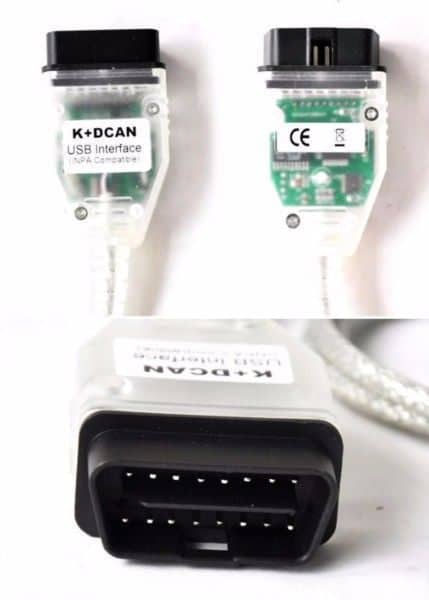
BMW INPA K D-CAN /DCAN Diagnostic Cable

R1060.00

BB Store Credit Earn PreviewEarn approx. R10.60 BB Store Credit1% base. Added after successful checkout and available for your next order.
Payflex Peach PAYMENTS Yoco
Brits Brothers Support

Need help with this part?

Fitment, stock, courier and returns help.
Click any service to learn more.
Repair package

Complete Repair Package

Open the package builder to choose your vehicle and repair area. It only loads after click.

BMW INPA K D-CAN /DCAN Diagnostic Cable is used for diagnostic communication with BMW vehicles that support D-CAN protocols

BMW INPA K D-CAN /DCAN Diagnostic Cable is designed to connect BMW vehicles equipped with INPA K or D-CAN protocols to diagnostic software or hardware for fault reading and system monitoring. This cable enables communication between your vehicle’s onboard computer and diagnostic tools, crucial for effective troubleshooting and maintenance.

The cable is specifically for BMW vehicle diagnostics, supporting data transfer through the CAN (Controller Area Network) and D-CAN interfaces commonly used in modern BMW models. When comparing your old diagnostic cable, ensure it matches the INPA K or D-CAN connection type to maintain compatibility and reliable diagnostics.

This unit serves as a key component for professional mechanics and BMW enthusiasts who need to access the vehicle’s electronic control units (ECUs) for fault codes and live data. Its functionality is essential for tasks such as error code clearing, parameter adjustments, and system checks.

  • Fits BMW models supporting INPA K and D-CAN protocols
  • Used in diagnostic applications to interface with vehicle ECUs
  • SKU reference: BB-258577

If your current diagnostic cable is damaged or incompatible, choosing this specific this part ensures you maintain diagnostic communication capabilities. Consider checking your vehicle’s diagnostic interface type before purchase or contact support for guidance on compatibility.

Need help matching this item to your vehicle? Use more Diagnostics, Vehicle Parts Finder or Request a Part with your VIN, engine number, part number or clear photos.

Frequently Asked Questions

Confirm fitment before ordering
Quick answers before you order. If anything is unclear, confirm fitment first using your VIN or part number and avoid mistakes.
Helpful product answers
What vehicles are compatible with the BMW INPA K D-CAN /DCAN Diagnostic Cable?
This diagnostic cable is designed specifically for BMW models that support K-line and D-CAN communication protocols. It works well with most BMWs manufactured from the late 1990s up to recent models that use these protocols. For precise compatibility, please provide your vehicle's VIN or model details to ensure the cable suits your car's diagnostic port.
How do I use the BMW INPA K D-CAN Diagnostic Cable for vehicle diagnostics?
Simply connect the cable to your BMW's OBD-II port and link it to your laptop or diagnostic device. The cable supports INPA software, allowing you to read fault codes, reset service lights, and perform advanced diagnostics. Ensure you have the correct software installed and follow the software instructions for accurate results.
Is this diagnostic cable compatible with other BMW diagnostic software besides INPA?
While primarily designed for INPA, the BMW INPA K D-CAN cable may also work with other BMW diagnostic programs that support K-line and D-CAN protocols. However, compatibility can vary, so it's best to confirm with the software provider or test the cable with your preferred software before purchase.
Can Trade Partners get special pricing or support for the BMW INPA K D-CAN Diagnostic Cable?
Yes, Trade Partners can benefit from tailored pricing and dedicated support when purchasing diagnostic tools like this cable. To explore partnership opportunities and access exclusive benefits, please visit our Trade Partners page or contact us directly.
What should I do if the BMW INPA K D-CAN Diagnostic Cable is faulty or not working properly?
If you experience issues with the cable, please check your connections and software setup first. Should problems persist, you can request a replacement or refund by visiting our Refunds page. Our support team is also available to assist with troubleshooting.