
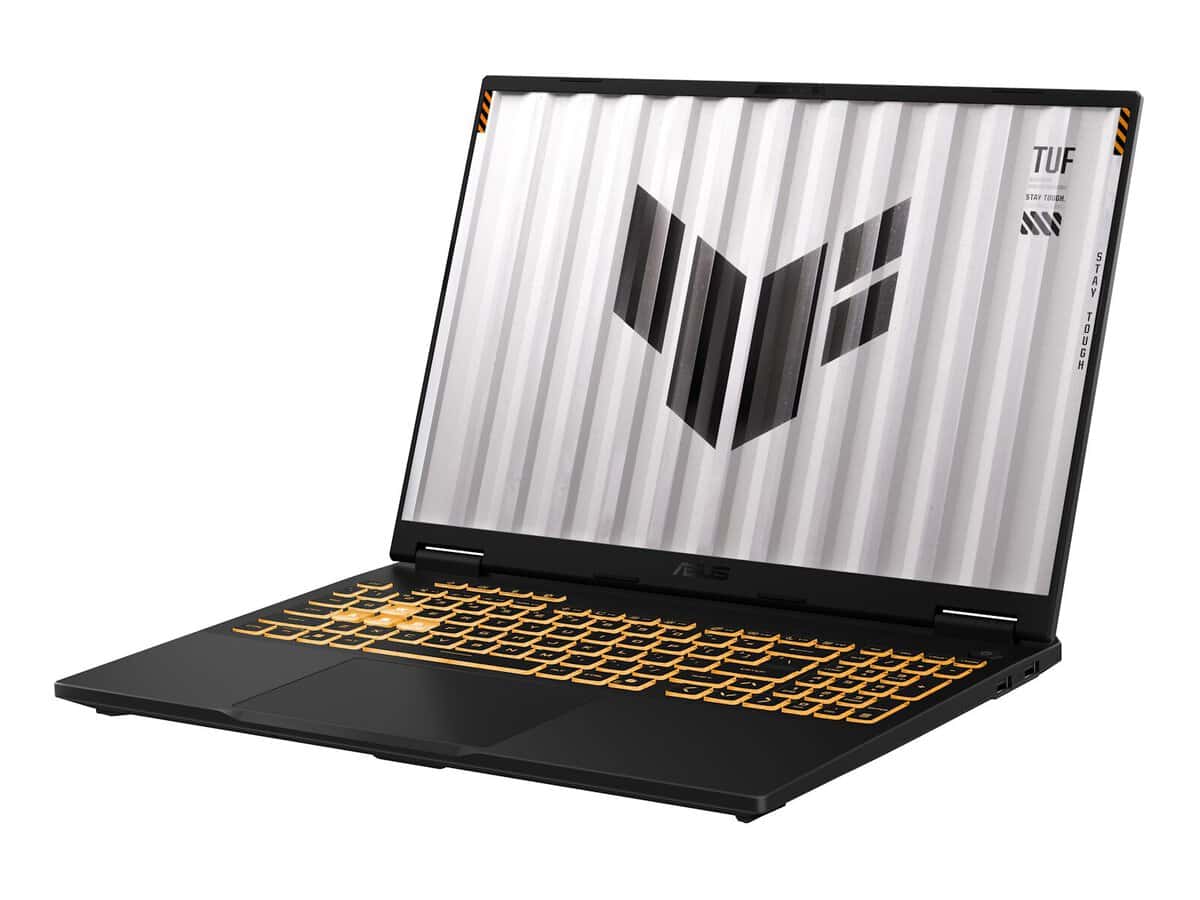



Asus TUF Gaming F16 FX608JHR 16″ Gaming Laptop – i7, 16GB RAM, 512GB SSD, Win 11 Home

R31634.60

BB Store Credit Earn PreviewEarn approx. R350.00 BB Store Credit1% base • +4% order tier. Added after successful checkout and available for your next order.
Payflex Peach PAYMENTS Yoco
Brits Brothers Support

Need help with this part?

Fitment, stock, courier and returns help.
Click any service to learn more.
Repair package

Complete Repair Package

Open the package builder to choose your vehicle and repair area. It only loads after click.

Asus TUF Gaming F16 FX608JHR 16″ Gaming Laptop – i7 16GB RAM 512GB SSD Win 11 Home. This gaming laptop features an Intel i7 processor, 16GB RAM, 512GB SSD storage, and Windows 11 Home

Asus TUF Gaming F16 FX608JHR 16″ Gaming Laptop – i7 16GB RAM 512GB SSD Win 11 Home is a high-performance device designed for demanding gaming and multitasking needs. This laptop features a 16-inch display that provides ample visual workspace, paired with an Intel i7 processor and 16GB of RAM to support smooth operation and fast response times in gaming and productivity tasks.

Equipped with a 512GB SSD, this unit offers significant storage capacity along with quicker boot-up and data access speeds compared to traditional hard drives. It comes pre-installed with Windows 11 Home, making it ready for use out of the box with a modern operating system suited for gaming and everyday computing.

This component is typically sought by users looking to upgrade from older or less powerful models while requiring a robust system for graphics-intensive applications. The laptop’s specifications make it a suitable choice for those needing balanced power and storage for games, creative software, and general use.

  • 16-inch gaming laptop format for immersive visuals
  • Intel i7 processor paired with 16GB RAM for smooth multitasking
  • 512GB SSD storage enhancing speed and responsiveness
  • Comes with Windows 11 Home pre-installed

When considering this laptop, compare your current unit’s processor, RAM, and storage specifications. If your usage demands higher performance or more storage, this part can be a strategic upgrade. For tailored advice or alternative options, engage with the sales desk or submit a request for another part to ensure the best match.

Need help matching this item to your vehicle? Use Samsung Galaxy Tab A11 Tablet – 8.7″, 64GB, LTE, Vehicle Parts Finder or Request a Part with your VIN, engine number, part number or clear photos.

Frequently Asked Questions

Confirm fitment before ordering
Quick answers before you order. If anything is unclear, confirm fitment first using your VIN or part number and avoid mistakes.
Helpful product answers
What are the key performance features of the Asus TUF Gaming F16 FX608JHR laptop?
The Asus TUF Gaming F16 FX608JHR is equipped with an Intel i7 processor, 16GB of RAM, and a 512GB SSD, making it well-suited for gaming and multitasking. It runs on Windows 11 Home, providing a modern and user-friendly interface. These specs ensure smooth gameplay and efficient handling of demanding applications.
Is the Asus TUF Gaming F16 suitable for professional work as well as gaming?
Yes, the combination of a powerful i7 processor and 16GB RAM allows this laptop to handle professional software like video editing, programming, and graphic design alongside gaming. The 512GB SSD offers fast storage access, which benefits both work and gaming tasks. However, always check specific software requirements to ensure compatibility.
What should I consider when choosing a protective case for the Asus TUF Gaming F16 FX608JHR?
Since this model has a 16-inch screen, it's important to select a protective case designed specifically for 16-inch laptops to ensure a snug fit. Avoid using cases meant for smaller sizes as they may not provide adequate protection or could cause damage. Look for durable materials and padding to protect against bumps and scratches during transport.
Can I upgrade the RAM or storage on the Asus TUF Gaming F16 FX608JHR?
Not specified. For upgrades, it's best to consult the official Asus documentation or contact Trade Partners who can provide expert advice on compatible components. Attempting to upgrade without proper guidance may void warranties or cause hardware issues.
What is a common mistake to avoid when setting up the Asus TUF Gaming F16 for gaming?
A frequent error is neglecting to update the graphics drivers and Windows OS before gaming, which can lead to performance issues or crashes. To correct this, always check for the latest driver updates via Asus support or Windows Update before installing games. This ensures optimal performance and stability.
How can I get support or parts for the Asus TUF Gaming F16 FX608JHR?
For support or to request parts, you can reach out to Brits Brothers™ Trade Partners who specialize in servicing Asus laptops. They offer expert assistance and genuine parts. You can also submit a parts request directly through the Request a Part page for convenience.