
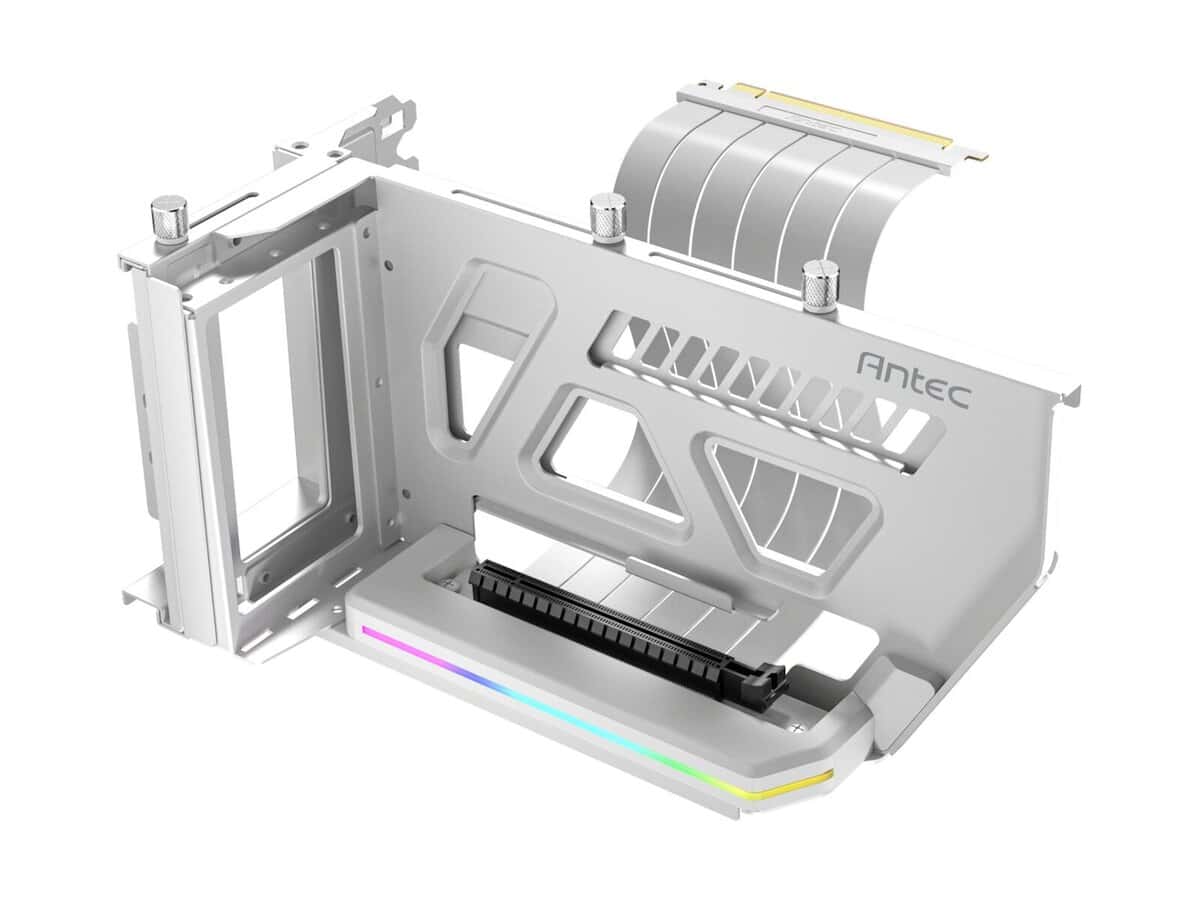
Antec SHIFT ARGB Vertical GPU Bracket with PCIe 4.0 Riser Cable – White

R1870.60

BB Store Credit Earn PreviewEarn approx. R46.77 BB Store Credit1% base • +1% payday • +0.5% weekend. Added after successful checkout and available for your next order.
Payflex Peach PAYMENTS Yoco
Brits Brothers SupportNeed help with this part?Fitment, stock, courier and returns help.
WhatsApp
Use Sales Desk, or choose a rotating WhatsApp support line.
Premium System

Complete Repair Package

Open the package builder to choose your vehicle and repair area. It only loads after click.

Antec SHIFT ARGB Vertical GPU Bracket with PCIe 4.0 Riser Cable – White offers a vertical mounting solution for GPUs with support for PCIe 4.0 riser cable in a white finish

Fitment Check
RepairMatch™ Fitment
Confirm this part against your vehicle before you order.
Check Fitment
Opens fitment page
Store Credit Deal
ThunderDeal™ Negotiator
Make a serious online offer and turn the approved value into BB Store Credit.
Open Negotiator
Shortcode page
Repair Package
Complete Repair Bundle
Build a matching repair package using this part as the starting point.
Build Bundle
Opens bundle page
Vehicle Search
Vehicle Parts Finder
Search by vehicle and find related parts faster.
Find Vehicle Parts
Opens finder page

Antec SHIFT ARGB Vertical GPU Bracket with PCIe 4.0 Riser Cable – White is a mechanical component designed to allow vertical mounting of a graphics card inside a compatible PC case, specifically the Antec SHIFT ARGB. This bracket setup includes a PCIe 4.0 riser cable to extend the PCIe slot connection, enabling the GPU to be displayed vertically rather than the standard horizontal orientation.

The primary function of this part is to enhance the visual presentation of a GPU and potentially improve airflow within the case by repositioning the graphics card. Users should compare the physical dimensions and PCIe slot compatibility of their existing setup with this unit. The riser cable must match the PCIe 4.0 standard for optimal bandwidth and performance compatibility with modern graphics cards and motherboard slots.

This top box bracket comes in white, matching the aesthetics of the Antec SHIFT ARGB case, and the SKU for reference is BB-394956. It is important to ensure your PC case model is compatible before purchasing, as the bracket is tailored for use with the Antec SHIFT ARGB chassis design and mounting points.

  • Vertical GPU mounting solution
  • Includes PCIe 4.0 riser cable for extended connectivity
  • Designed for Antec SHIFT ARGB case
  • White finish to complement case styling

If this repair may need matching clips, brackets, lights, panels or more than one part, check Huawei IdeaHub Wall Mount Bracket, Quick Repair Bundle or Request a Part before ordering.

Frequently Asked Questions

Confirm fitment before ordering
Quick answers before you order. If anything is unclear, confirm fitment first using your VIN or part number and avoid mistakes.
Helpful product answers
What is the purpose of the Antec SHIFT ARGB Vertical GPU Bracket with PCIe 4.0 Riser Cable?
This bracket allows you to mount your GPU vertically inside your PC case, showcasing the graphics card's design and ARGB lighting. It also includes a PCIe 4.0 riser cable to maintain high-speed data transfer between the GPU and motherboard. This setup is ideal for custom builds where aesthetics and airflow are priorities.
Is the PCIe 4.0 riser cable compatible with all motherboards and GPUs?
The riser cable supports PCIe 4.0, which is backward compatible with PCIe 3.0 and earlier versions. However, compatibility depends on your case layout and motherboard PCIe slot placement. Ensure your case supports vertical GPU mounting and that the riser cable length fits your setup to avoid installation issues.
How do I install the vertical GPU bracket correctly?
First, remove your existing GPU mounting bracket and secure the Antec SHIFT bracket in its place. Connect the PCIe riser cable to the motherboard slot and then attach your GPU to the riser cable. A common mistake is forcing the riser cable into the slot without proper alignment, which can damage connectors. Take care to align the connectors gently and secure all screws firmly.
Does the ARGB lighting on the bracket require additional connections?
Yes, the ARGB lighting on the bracket needs to be connected to your motherboard's ARGB header or a compatible controller. This allows you to synchronize lighting effects with other ARGB components. If your motherboard lacks an ARGB header, you may need an external controller to manage the lighting.
Can I use this bracket with non-ARGB GPUs?
Absolutely. The vertical bracket and riser cable function independently of your GPU's lighting features. Even if your GPU does not have ARGB lighting, the bracket will still provide a stylish vertical mount and maintain PCIe 4.0 performance. The ARGB lighting on the bracket itself can be controlled separately.
Where can Trade Partners get more information or request parts for this product?
Trade Partners can visit the Brits Brothers™ Trade Partner page for detailed product info and support. For part requests related to this bracket or other components, use the official request form at Request a Part. This ensures quick and accurate assistance with your orders.