
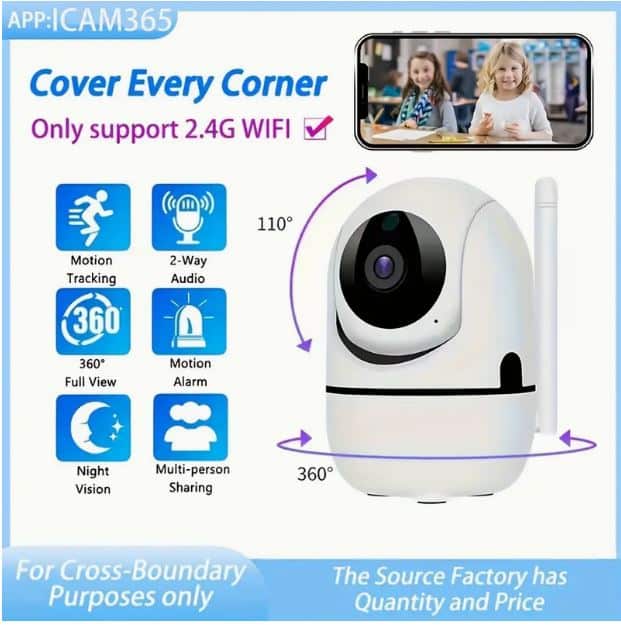

Wireless WiFi Security Home Camera, Pet Monitor and Nanny Cam
Advanced Security and Monitoring Solution for Your Home and Loved Ones
Product Highlights
- Seamless wireless WiFi connectivity for easy installation and remote access
- High-definition video streaming supports real-time monitoring from anywhere
- Multi-purpose design: security camera, pet monitor, and nanny cam in one device
- Two-way audio feature to communicate directly through the camera
- Motion detection and instant alerts delivered to your smartphone
- Night vision mode to ensure round-the-clock surveillance
- Compact and sleek design fits discreetly in your home or office
- Compatible with mobile apps available on Google Play for seamless control (see below)
Condition and What You Get
This Wireless WiFi Security Home Camera is delivered in excellent condition. Each purchase includes the camera unit, power adapter, mounting accessories, user manual, and quick-start guide. Designed to be plug-and-play, installation is user-friendly even if you are new to home security devices.
Please note: This product is supplied as new and unused. Always verify compatibility and specifications to ensure it meets your requirements.
Shipping & Returns – Trust and Reliability
We partner with The Courier Guy for fast, reliable shipping across South Africa. Your order is carefully packaged and dispatched promptly to ensure it reaches you in perfect condition.
For detailed information on returns and refunds, please visit our Refund & Returns Policy. Customer satisfaction is our priority—should you encounter any issues, our support team is ready to assist you.
Technical & Fitment Snapshot
| Specification | Detail | Notes |
|---|---|---|
| Connectivity | Wireless WiFi (2.4GHz Common) | Typical/Common – Confirm fitment with your network |
| Video Quality | High Definition (HD) | Typical for home security cameras |
| Power Supply | AC Adapter Included | Confirm voltage compatibility |
| Audio | Two-Way Audio | Allows communication via app |
| Night Vision | Infrared LEDs | Standard for 24/7 monitoring |
| Mobile App Support | Available on Android (Google Play) | Download link below |
Used-Parts Disclaimer
Please note this product description is for a new Wireless WiFi Security Home Camera. If browsing for used parts, always ensure compatibility and be aware that used items may have signs of previous use or wear. For selling or requesting used parts, visit our dedicated pages: Request a Part | We Buy Used Parts.
Questions? Contact Us on WhatsApp!
Need help with availability, fitment, or any other query about this Wireless WiFi Security Home Camera? Reach out instantly via WhatsApp for personalized assistance. Click the link below to start your conversation with Brits Brothers™ Parts Assist:
Get The Brits Brothers™ App for Easy Mobile Shopping

Common Issues This Wireless WiFi Security Camera Helps Solve
Homeowners and pet owners frequently encounter a variety of monitoring challenges and security concerns that this Wireless WiFi Security Home Camera is designed to address effectively. Understanding the common problems this device solves can help you decide if it matches your needs:
- Unauthorized Entry or Trespassing: Many homeowners face risks of burglary or suspicious activity around their property. This camera’s motion detection combined with live HD video streaming lets you monitor your premises remotely, providing peace of mind.
- Pet Safety and Supervision: Whether you need to keep an eye on your pets while away or monitor their behavior, this camera’s easy installation and two-way audio allow you to interact and ensure they are safe and calm.
- Nanny or Caregiver Monitoring: Parents and guardians often want discreet surveillance to verify the well-being and activities of their children or elderly relatives under care. This camera captures clear video day and night, plus it supports audio communication for reassurance.
- Package Theft Prevention: Online shopping increases home deliveries but also risks of stolen packages. Position this camera near entryways or porches to watch deliveries and immediately receive alerts when motion is detected.
- Poor Lighting Conditions: Typical security cameras struggle at night or in low-light situations. Thanks to its built-in infrared LEDs, this camera switches to night vision mode automatically, ensuring consistent surveillance all day and night.
- Complex Setup and Control: Traditional wired security systems can be difficult to install or update. This device connects wirelessly over common 2.4 GHz WiFi networks and offers control through an intuitive mobile app, making management simple and accessible.
By addressing these common home security and monitoring challenges, the Wireless WiFi Security Home Camera stands out as a versatile solution for modern households prioritizing safety, convenience, and real-time connectivity.
Buying Guide: How to Verify Compatibility with Your Home Setup
Selecting the right security camera involves careful consideration of compatibility factors to ensure flawless integration and optimum performance. Follow these essential steps before purchasing:
1. Confirm Your Home WiFi Network Frequency
This camera supports wireless WiFi connectivity on the common 2.4 GHz band. Verify your home router broadcasts on 2.4 GHz or supports dual-band (2.4 GHz & 5 GHz). Most routers provide this info on labels or configuration pages. A stable 2.4 GHz network ensures reliable video streaming and control.
2. Check Your Smartphone Compatibility
The camera’s app is available on Google Play for devices running Android OS. Make sure your smartphone OS version meets app requirements for seamless remote monitoring and notifications. iPhone users may check related app availability or similar supported apps via the product vendor.
3. Understand Installation Space and Mounting Needs
Review your planned installation location regarding power access and WiFi signal strength. The camera requires a power source via AC adapter and a good WiFi signal. Consider mounting options, whether on walls, shelves, or ceilings — check included mounting accessories fit well for your intended setup.
4. Review Product Dimensions and Visibility
The camera’s compact size allows discreet placement. Still, it’s beneficial to assess its dimensions relative to your intended area to confirm field of view coverage. Photos and product specs can assist in visualizing fitment, keeping in mind that ideal placement maximizes monitoring efficiency.
5. Verify Power Supply Compatibility
Ensure that your country’s standard voltage matches the included AC Adapter specifications. Using incompatible power supplies may damage the device or void warranties. Refer to product labels or user manual for supported voltage ranges before use.
Adhering to this buying guide helps guarantee your Wireless WiFi Security Home Camera functions smoothly within your home environment without frustrating compatibility issues.
Installation Notes: Ensuring Safe and Effective Setup
Proper installation is critical to maximize the performance and longevity of your Wireless WiFi Security Home Camera. Whether you’re setting it up yourself or opting for professional installation, keep the following tips in mind:
Location Selection
Choose an area with clear sight lines to the monitoring target, avoiding obstacles that might block WiFi signals or video frames. Consider corners or elevated positions that provide wide coverage and minimize blind spots.
Power Source Accessibility
The camera requires constant power via the included AC adapter. Ensure proximity to power outlets or use approved extension cords as necessary. Avoid placing near water sources or damp areas to prevent electrical hazards.
Mounting Procedures
Use the included mounting accessories to firmly affix the camera. Ensure the mounting surface is sturdy and stable. Follow manufacturer instructions carefully to avoid damage during installation. Hammer-free or adhesive options may be used depending on the surface and device design.
Network Setup and Configuration
Connect the camera to your home WiFi through the mobile app interface. It’s best to do this close to your router initially for easy pairing. Follow in-app instructions for adding the device and setting preferences such as motion zones, notification triggers, and audio features.
Professional Fitment Recommended
While the camera is designed for user-friendly DIY installation, seeking professional assistance may be beneficial if you are unfamiliar with home networking or electrical safety. Experts can ensure optimal placement, secure mounting, and correct network integration.
Taking these installation notes seriously will help you achieve reliable real-time monitoring, prevent connectivity headaches, and enable full utilization of the camera’s smart features.
Maintenance and Care Tips for Longevity
To keep your Wireless WiFi Security Home Camera functioning optimally for years, regular maintenance and mindful care are crucial. Follow these expert tips:
Clean the Lens Regularly
Dust, smudges, and fingerprints can degrade image quality. Use a soft microfiber cloth to gently wipe the lens surface weekly or as needed. Avoid harsh chemicals—opt for lens cleaning solutions designed for delicate optics if required.
Check Firmware and App Updates
Manufacturer updates often improve camera performance, patch security vulnerabilities, and add new features. Regularly check the mobile app or product website for firmware upgrades and apply them promptly to maintain secure operation.
Inspect Cables and Mounts
Periodically examine power cables, connectors, and mounting fixtures for signs of wear, fraying, or loosening. Replace damaged parts immediately to prevent failure or hazards. Tighten loose screws to keep the camera stable and properly oriented.
Optimize WiFi Signal Strength
Poor WiFi quality reduces video streaming smoothness and alert response times. Ensure your router is in a central location or consider WiFi extenders to boost signals near installed cameras. Remove or relocate sources of interference like microwaves or thick walls when possible.
Keep Software & Passwords Secure
Protect your camera’s access credentials with strong unique passwords. Avoid default passwords and never share them publicly. Regularly update passwords and enable two-factor authentication on related accounts if supported.
With proper upkeep, your Wireless WiFi Security Home Camera will deliver continuous reliable performance that safeguards what matters most to you, longest with minimal interruptions.
Quick Fitment & Usage FAQs
Q1: Will this camera work with any 2.4 GHz WiFi network?
The Wireless WiFi Security Home Camera is compatible with standard 2.4 GHz WiFi routers. However, it’s important to verify your network strength and stability to prevent connection drops. Dual-band routers generally support 2.4 GHz, but check your settings to confirm.
Q2: Can I use the camera with multiple smartphones?
Yes. The camera app supports registration of multiple users, allowing family members or authorized users to access the live feed, recordings, and camera controls securely.
Q3: Does this camera require professional installation?
The device is designed for easy DIY installation and setup through the mobile app. However, if you’re uncertain about networking or mounting, professional installation is recommended to optimize performance and safety.
Q4: How do I troubleshoot if the camera doesn’t connect?
Start by ensuring your WiFi network is active and within range. Restart your router and camera. Verify you are connecting to a 2.4 GHz network inside the app. Refer to the included manual or contact customer support for guided assistance.
Q5: Is recorded footage stored locally or in the cloud?
Depending on the app and model settings, video footage can be stored on a microSD card inside the camera (if supported) or uploaded to a secure cloud service via subscription. Refer to the product manual or app settings to configure your preferred option.
Shipping Expectations within South Africa
When ordering your Wireless WiFi Security Home Camera from Brits Brothers™, you can expect reliable and efficient shipping services throughout South Africa facilitated by The Courier Guy. Here is what to expect:
- Processing Time: Orders are typically processed and dispatched within 1-2 business days following payment confirmation and stock validation.
- Delivery Timeframes: Standard delivery times usually range between 2 to 5 business days depending on your location within South Africa—remote areas may take slightly longer.
- Secure Packaging: We ensure your camera and accessories are carefully packed with protective materials to prevent damage during transit.
- Tracking Your Order: Once shipped, you will receive a tracking number via email or SMS. Use this reference on The Courier Guy’s tracking portal to monitor real-time shipment progress.
- Delivery Confirmation: Couriers may require a signature upon delivery for security reasons. Ensure someone is available to receive packages at the specified address.
By partnering with a trusted logistics provider like The Courier Guy, Brits Brothers™ aims to provide smooth, transparent, and customer-friendly delivery experiences so you can start using your new Wireless WiFi Security Home Camera without delay.