
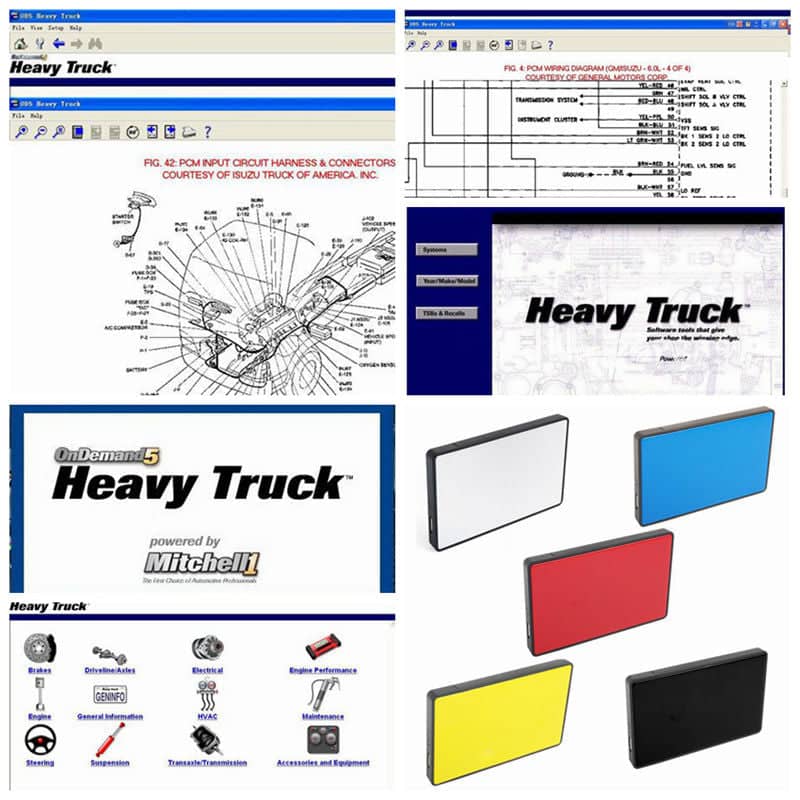

2019 Hot Auto Repair Data Software Mitchell ondemand5 Heavy Truck Auto Diagnostic Software car repair information service manual

R4050.00

BB Store Credit Earn PreviewEarn approx. R182.25 BB Store Credit1% base • +2% order tier • +1% payday • +0.5% weekend. Added after successful checkout and available for your next order.
Payflex Peach PAYMENTS Yoco
Brits Brothers SupportNeed help with this part?Fitment, stock, courier and returns help.
WhatsApp
Use Sales Desk, or choose a rotating WhatsApp support line.
Premium System

Complete Repair Package

Open the package builder to choose your vehicle and repair area. It only loads after click.

2019 Hot Auto Repair Data Software Mitchell ondemand5 Heavy Truck Auto Diagnostic Software car repair information service manual. This diagnostic software offers repair data and service information for heavy trucks

Fitment Check
RepairMatch™ Fitment
Confirm this part against your vehicle before you order.
Check Fitment
Opens fitment page
Store Credit Deal
ThunderDeal™ Negotiator
Make a serious online offer and turn the approved value into BB Store Credit.
Open Negotiator
Shortcode page
Repair Package
Complete Repair Bundle
Build a matching repair package using this part as the starting point.
Build Bundle
Opens bundle page
Vehicle Search
Vehicle Parts Finder
Search by vehicle and find related parts faster.
Find Vehicle Parts
Opens finder page

2019 Hot Auto Repair Data Software Mitchell ondemand5 Heavy Truck Auto Diagnostic Software car repair information service manual is an auto-part listing that should be matched against the vehicle or part currently being replaced. Use the product title, photos, SKU and category as the main reference points.

Use these listing details while checking the part: Product identity: this part; SKU: BB-258674; Year range: 2019; Vehicle wording from title: 2019 Hot Auto.

Compare the part in the photos against the old component on the vehicle. Look at the shape, side or position, mounting points, plugs, brackets, ports and any number stamped or labelled on the item.

Where the title includes a year, model, engine or trim detail, treat that information as part of the match. Small differences between vehicle versions can change the correct replacement part.

Use these listing details while checking this item: Product identity: this part; SKU: BB-258674; Year range: 2019; Vehicle wording from title: 2019 Hot Auto.

Before payment, compare the listing photos with the old part from more than one angle. Focus on the parts that decide fitment: shape, side, mounting points, plugs, ports, brackets, stamped numbers and any visible trim or facelift differences.

Need help matching this item to your vehicle? Use more Diagnostics, Vehicle Parts Finder or Request a Part with your VIN, engine number, part number or clear photos.

Frequently Asked Questions

Confirm fitment before ordering
Quick answers before you order. If anything is unclear, confirm fitment first using your VIN or part number and avoid mistakes.
Helpful product answers
What vehicles are compatible with the 2019 Mitchell ondemand5 Heavy Truck Auto Diagnostic Software?
This software is designed primarily for heavy trucks and commercial vehicles, providing detailed diagnostic and repair information. It supports a wide range of truck makes and models from recent years, but specific compatibility depends on the vehicle's onboard systems. For exact fitment, please contact our Trade Partners for guidance.
Can I use this software for light vehicles or passenger cars?
The 2019 Mitchell ondemand5 software focuses on heavy truck diagnostics and repair data, so it may not cover light vehicles or passenger cars comprehensively. If you require software for smaller vehicles, we recommend consulting with our Trade Partners to find the most suitable product for your needs.
How do I install and update the Mitchell ondemand5 software?
Installation details are typically provided with the software package or via the official Mitchell support channels. Updates are essential to keep repair data current and usually require an internet connection. For assistance with installation or updates, please reach out to our Trade Partners or contact us directly through WhatsApp.
What is the return policy if the software does not meet my needs?
If the software does not meet your requirements, you can request a return or refund within the stipulated period, provided the product is unused and in its original condition. Returns are handled carefully to protect buyers, and you can find detailed information on our Refunds page. Contact our support team for personalised assistance.
Is technical support available for this diagnostic software?
Technical support is generally available through the software provider or via our Trade Partners who can assist with troubleshooting and usage queries. We recommend contacting them directly for specialised help to ensure you get the most out of your diagnostic software investment.