

2-in-1 Apple Carplay and Android Auto USB Dongle For Android Car Radios
Revolutionize your in-car entertainment with seamless connectivity for both Apple and Android devices.
Product Overview
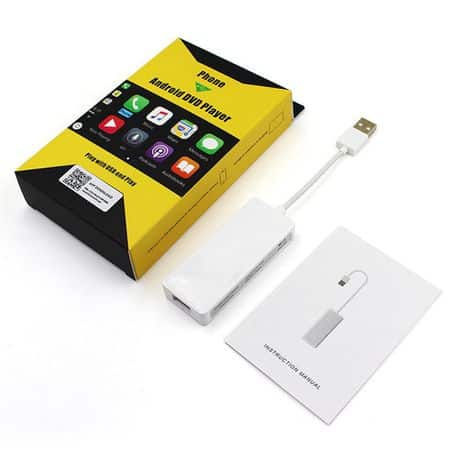
Unlock the full potential of your Android car radio with the 2-in-1 Apple Carplay and Android Auto USB Dongle. Designed for effortless compatibility with both Apple iOS and Android smartphones, this smart dongle transforms your vehicle’s entertainment system into a fully integrated digital hub. Stream music, navigate with your preferred maps app, and make hands-free calls with intuitive ease. Whether you’re on a daily commute or a long road trip, this device ensures safe and convenient access to your phone’s key features without distraction.
Featuring straightforward plug-and-play installation, the dongle connects seamlessly to your car’s USB input, automatically activating Apple Carplay or Android Auto depending on the connected device. Its advanced chipset guarantees smooth and stable performance for both platforms. Experience crystal-clear voice commands and responsive touch controls compatible with your existing radio display. Enhance your driving experience with this versatile and high-functionality dongle engineered to keep you connected while on the move.
Highlights
- Dual compatibility: supports both Apple Carplay and Android Auto
- Easy plug-and-play USB connection
- Works with all Android car radios featuring USB input
- Supports voice commands and hands-free functionality
- Stable and low-latency performance chipset
- No additional wiring or complicated installation required
Condition & What You Get
This product is sold as a new electronic accessory. Included in the package:
- 1 x 2-in-1 Apple Carplay and Android Auto USB Dongle
- User manual and quick start guide
- Standard USB connection cable
Note: This device is designed to be compatible with most Android car radios equipped with a USB port; however, please confirm your car radio’s compatibility before purchasing.
Shipping & Returns
We collaborate with trusted logistics providers like The Courier Guy to ensure your order arrives promptly and safely. Fast domestic delivery options are available nationwide with tracking included.
If you are not completely satisfied with your purchase, please view our Refund & Returns Policy for easy returns and refunds.
Contact Us Instantly via WhatsApp
Have questions or want to confirm availability and fitment? Message us directly on WhatsApp for quick support and expert assistance.
Technical & Fitment Snapshot
| Specification | Details |
|---|---|
| Compatibility | Apple Carplay and Android Auto (Dual Mode) |
| Connection Interface | USB (Type A) – Typical/Common, Confirm fitment |
| Supported Operating Systems | iOS 13+ and Android 8.0+ (Typical/Common) |
| Installation Type | Plug & Play USB Dongle |
| Power Supply | Via USB Port (Typical/Common) |
| Wireless Connectivity | No (Requires cable connection) |
| Audio & Video Support | Full audio streaming, video interface via host radio unit |
| Voice Control | Supports Siri and Google Assistant |
| Compatibility Notes | For Android car radios with USB input only – please confirm your radio model |
About Our Used Parts & Accessories
Important Disclaimer: Used vehicle parts and accessories are sold as-is and may exhibit wear or previous use signs. We strive to provide accurate descriptions, but functionality is not guaranteed beyond stated conditions. Always confirm compatibility and intended use before purchase. When buying used items, be aware that warranty coverage may be limited or not applicable. We recommend professional installation to avoid damage or safety risks.
Get the Brits Brothers™ App for Easy Shopping
Download our free app for quick access to our entire catalog, special offers, and live updates.

Looking for other compatible components or parts? Request your specific part via our Request a Part service or sell your used vehicle parts quickly through our We Buy Parts program.
For trade inquiries and partnerships, visit our Trade Partner page.
Common Symptoms This Dongle Solves
Are you experiencing issues with your car radio’s smart device connectivity? The 2-in-1 Apple Carplay and Android Auto USB Dongle is designed to address a variety of common symptoms that users face when integrating smartphones with their Android car radios:
- Unrecognized Device: Your radio fails to detect or establish a connection with your iPhone or Android smartphone through the USB port.
- Missing Apple Carplay or Android Auto Functionality: Even though your car radio supports these platforms, the features don’t seem to activate or load properly.
- Audio Streaming Interruptions: Frequent cuts or inconsistent audio playback when streaming music or podcasts from your phone.
- No Voice Assistant Access: Siri or Google Assistant voice commands do not respond or appear disabled when connected to your car system.
- Incompatible USB Interfaces: Older or generic USB inputs in your car’s head unit do not facilitate a direct connection for digital media protocols.
By adding this dedicated dongle, many car owners can restore stable and efficient smartphone integration, eliminating frustrating connectivity interruptions and regaining full access to their apps, navigation, hands-free calling, and voice commands.
How to Verify Compatibility Before Purchasing
Purchasing a USB dongle designed for both Apple Carplay and Android Auto compatibility requires ensuring it matches your car radio’s capabilities and physical inputs.
Follow these key steps to verify compatibility:
- Identify Your Car Radio Model: Check your vehicle’s user manual or head unit brand and model number, typically displayed on the startup screen or accessible via settings menus.
- Confirm USB Input Type: This dongle connects via a standard USB Type A port. Make sure your radio features a USB port that accepts Type A connectors (rectangular shape), and it is intended for data transfer, not just charging.
- Check Software Support: Verify your Android car radio supports Apple Carplay and Android Auto protocols, even if through an adapter or dongle. Consult the manufacturer’s website or support lines to confirm these features.
- Inspect Existing Cables and Ports: Test your vehicle’s USB ports with other devices to ensure functionality. If ports are loose or damaged, connectivity may still be an issue despite dongle usage.
- Refer to Operating System Requirements: Ensure your smartphone runs compatible OS versions (iOS 13 or later for Apple devices, Android 8.0 or later for Android devices).
- Review Product Photos and Dimensions: Though dongles typically have similar sizes, verify that the physical dimensions won’t obstruct other ports or vehicle controls.
If you’re uncertain about compatibility, contact our support team or use the WhatsApp link below for personalized assistance.
Professional Installation and Important Notes
While the 2-in-1 Apple Carplay and Android Auto USB Dongle boasts a plug-and-play design aimed at simplifying installation, here are important guidelines to ensure safety and optimal performance:
- Ensure the Vehicle is Parked: Before plugging in the dongle or connecting devices, make sure your vehicle is stationary and the engine is off to prevent distractions and electrical surges.
- Use Only the Included USB Cable: For best signal integrity and power compatibility, use the supplied cable rather than third-party replacements that might degrade performance.
- Avoid Forcing USB Connections: Insert the dongle and cables gently to avoid damaging the ports on your car radio.
- Consult Vehicle User Manual: Some car radios require enabling USB accessory modes through system settings before accessories like dongles can be recognized.
- Professional Fitment Recommended: Although no wiring modification is needed, professional automotive electronics installers or technicians can provide peace of mind by ensuring correct and secure connections without interfering with factory settings.
- Avoid Excessive Heat Exposure: Install the dongle in a location away from direct sunlight or heat sources to prevent overheating.
Following these precautions helps safeguard your car’s electronics and ensures a stable connection between your smartphone and radio.
Maintenance Tips for Longevity
To maximize the lifespan and performance of your 2-in-1 Apple Carplay and Android Auto USB Dongle, consider these practical maintenance tips:
- Regularly Inspect the USB Port: Periodically check the USB port and connectors for dust, dirt, or corrosion. Use compressed air to gently remove debris but avoid liquid cleaners.
- Handle Cables with Care: Avoid bending or twisting the connection cable aggressively. Store cables neatly when not in use.
- Keep Firmware Updated: Check periodically for software or firmware updates related to your car radio or smartphone OS. Updated systems optimize compatibility and resolve bugs.
- Disconnect When Not in Use: Unplug the dongle when leaving your vehicle for extended periods to prevent unnecessary power draw or possible short circuits.
- Avoid Exposure to Liquids: Protect the dongle and USB cables from moisture and spills inside the vehicle.
- Temperature Control: Try parking in shaded areas to limit heat exposure that can damage electronic components over time.
By adhering to these simple maintenance habits, you’ll enjoy consistent performance from your dongle over many vehicle journeys.
Shipping Expectations Within South Africa
We pride ourselves on reliable and efficient delivery across South Africa. When you order the 2-in-1 Apple Carplay and Android Auto USB Dongle, here’s what you can expect regarding shipping:
- Fast Dispatch: Orders are typically processed and dispatched within 1–2 business days after payment confirmation.
- Trusted Courier Services: We utilize The Courier Guy for our shipping needs, ensuring parcels reach you safely and promptly.
- Tracking Provided: Once your package ships, you will receive a tracking number via email or WhatsApp, allowing you to monitor delivery in real-time directly on The Courier Guy’s website.
- Nationwide Coverage: No matter where you are in South Africa—from major cities to smaller towns—our logistics partners strive to deliver without delay.
- Packaging: The dongle is securely packed with adequate padding to prevent damage during transit.
- Delivery Timeframes: Expect deliveries typically within 3 to 7 business days, depending on your location and courier schedules.
For the latest updates on your order status, you can visit The Courier Guy tracking portal and enter your tracking reference number.
Related Parts